2018-12-10

Network aggregation project on Jetway JNF76 motherboard


Prehistory

Since my NAS revival project last year, I already had in mind to try the link aggregation feature, which was supported by my router. Initially I expected simply to pair up integrated Realtek RTL8111C NIC controller with Intel PRO/1000 GT PCI adapter as I already had one in the pile of my parts. For this purpose I even bought an Akiwa GHP-PCI106H PCI riser card (I use their GHB-B05 case) which wasn't so trivial to find - it was available in several industrial PC online shops only and, because they communicate exclusively with the juridical entities I needed to go through an intermediate party to buy it. When everything was ready, I believed that it would be a relatively straight forward setup. However, it ended up in a quite longer story than expected.

Akiwa GHP-PCI106H PCI riser card

Initial plan failed

The aforementioned configuration failed immediately after I attached the PRO/1000 GT adapter. I hit an old JNF76 motherboard BIOS issue that expansion cards with their own firmware may clash with ADPE4S-PB SATA II daughterboard, rendering the system completely unbootable. Intel's card had one with PXE boot support. This limitation have never been fixed by Jetway, thus I have no knowledge of any solution to resolve the situation. Unfortunately, it was clear that this configuration was a no go.
Intel PRO/1000 GT PCI network adapter

Looking for new solutions

One hiccup didn't deter me from completing the project though. It pushed me to look for other possible options to go around the limitation. Most likely the simplest way would have been to find another NIC adapter which wouldn't clash with the daughterboard. That meant buying the card without PXE boot support. As a proof of that, I have successfully tested an old VIA based Fast Ethernet (100Mbps) PCI network adapter. Indeed, it didn't clash with ADPE4S-PB on BIOS POST process and it was perfectly working in the Linux environment. Although this option looked quite appealing initially, there were few Realtek based GbE adapters in the market, however their description tended to be vague at times and I felt that I may have ended up buying yet another incompatible card. More than that, the whole link aggregation idea was also a bit risky and it might have left me with the second GbE network adapter buried deep in the pile of old parts. Because of all of this, it made me rethink of the NAS configuration a bit, which would solve another outstanding issue.
 
ADPE4S-PB SATA II controller

Reasoning for ADPE4S-PB replacement

The main reason for the configuration change was the same ADPE4S-PB daughterboard. Besides those clashes with expansion cards and a bit of challenging configuration, I was also experiencing another very annoying issue with it. I used this controller to attach SSD with the host OS only. Relatively soon after I made it work and boot the system, I started to face unstable behavior during the Linux boot process. From time to time Arch Linux was failing to initialize the SSD, forcing me to the reset loop till the successful attempt. Few times I was spending up to an hour on clicking reset button... I haven't figured out the actual reason for this, but it could have been everything from the driver to the bad cable connection (my SSD's SATA plug is physically damaged) or improperly attached daughterboard. It led me to the decision to replace ADPE4S-PB board with the LAN expansion daughterboard instead. I chose an AD3INLANG-LF module which hosts three Intel 82541PI based network controllers, the same used by PRO/1000 GT adapter. It was readily available through amazon but I required some help from a friend in the US to deliver it to Europe. For an SSD drive I decided to use my old Delock PCI USB/SATA combo card.

AD3INLANG-LF daughterboard

Inserting AD3INLANG-LF daughterboard

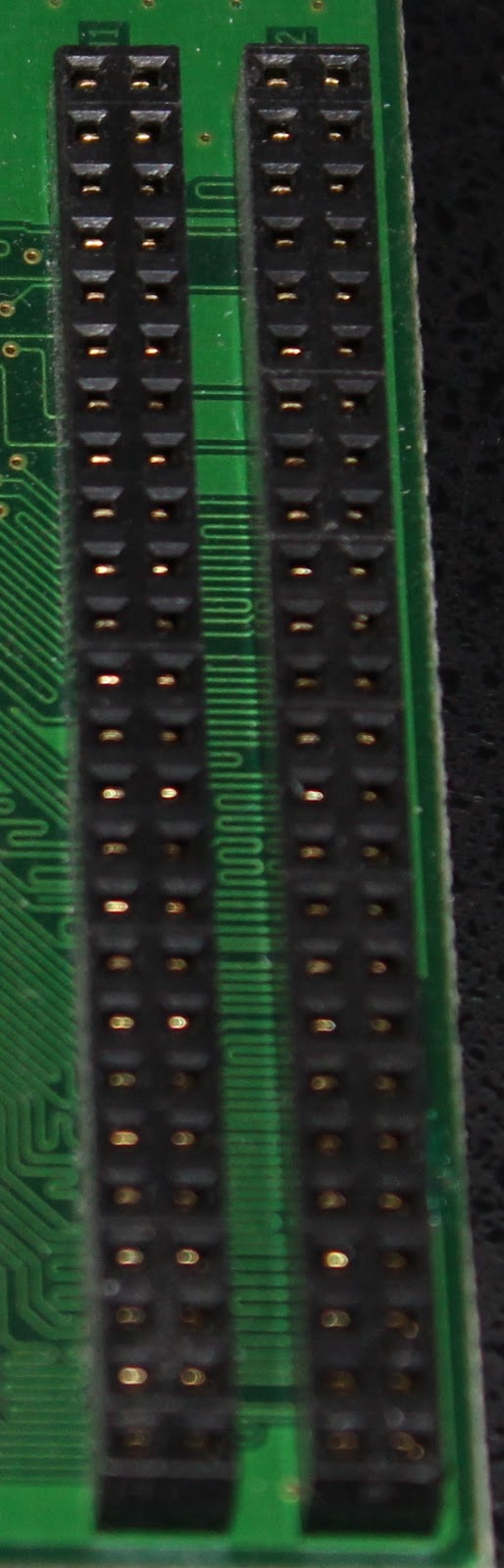
Since I attached the SATA daughterboard many years ago, I already forgot how actually tricky is the process of inserting it to proprietary JWDB header. For some weird reason Jetway doesn't provide the manual and you can find that at least a few people are complaining about the attaching process in product reviews, blog items or forums, some taking even quite extreme measures to make it seat properly. If it's not, the daughterboard either will fail to work completely or it can even light up (for example, green light on LAN port if cable is attached) but non of the interfaces will be identified or initialized in the OS or BIOS. Nevertheless, the actual process shouldn't require much force, using the trial-error approach, I have managed to insert it properly by aligning inner pins (means the ones closer to CPU side) with the plug holes on the daughterboard in a 30-45 degree angle and sliding it in a circular motion and a slight force into the second row. You can actually feel a small resistance when it goes into the header. Once properly seated, you can even try to lift it up gently, it shouldn't move out of place or fall to any side from its own weight. Also, you can check pins under the daughterboard: they should be evenly aligned on both sides and almost touching the header's plastic.
JWDB connector on ADPE4S-PB daughterboard


Finally, you can enter BIOS setup and check if three new boot ROM options for LAN interfaces (Addon Intel Lan1 to Lan3) appeared in the Integrated Peripherals -> Onboard Device Function section (not sure if it appears for Realtek based daughterboard as well). In case of SATA daughterboard, it would show it's own BIOS screen for the RAID setup.
New entries in BIOS after inserting AD3INLANG-LF daughterboard

Delock PCI USB/SATA combo card

89140 Delock PCI card combo USB2.0/eSATA/ATA has 1xSATA, 1xESATA, 1xIDE and 4xUSB 2.0 ports. SATA/IDE is based on VIA VT6421A SATA RAID controller and USB 2.0 is managed by VIA Vectro VT6214L USB host controller. Similar to the Marvell controller on ADPE4S-PB daugtherboard, VIA VT6421A doesn't have a built-in support in Arch Linux and requires to load additional kernel module. Some resources were mentioning satavia name, however Arch Linux uses sata_via with the underscore. So I modified the /etc/mkinitcpio.conf file by adding sata_via module to MODULES=(sata_via) line and regenerated initramfs (mkinitcpio -g /boot/initramfs-linux.img). After the reboot, the controller was successfully recognized and it was now possible to boot the OS from it. The USB controller was recognized without any additional configuration though, but it doesn't support loading OS from it (at least, not on JNF76 motherboard). Although, it may seem as a drastic downgrade to already subpar SATA II controller but an SSD performance is still significantly faster than any USB 2.0 flash drive I have used before for the same purpose (it reaches ~80MB/s for writing and reading from my testing). Most importantly I haven't faced SSD initialization issues with it which saves lots of headache on system reboot process. Unfortunately, I can't make a comparison to ADPE4S-PB as I have never done or recorded performance tests for it and I realized that after finishing my current setup only. As mentioned in the previous chapter, reattaching modules is quite a complicated and time-consuming process, so I am not keen to do it just for testing purposes.
Delock PCI USB/SATA combo card

AD3INLANG-LF speed test without link aggregation

As described previously AD3ILANG-LF daughterboard consists of three Intel 82451PI Ethernet controllers. It is a 32-bit 3.3V PCI 2.3 based controller, which supports 33MHz and 66 MHz speeds. Controllers were identified as GI version instead by Linux (the difference is the manufacturing stepping of the controller, where GI is manufactured in B1, PI in C0 stepping). lspci -v output for one of the controllers can be seen below:

04:04.0 Ethernet controller: Intel Corporation 82541GI Gigabit Ethernet Controller (rev 05)
      Subsystem: Intel Corporation PRO/1000 MT Network Connection
      Flags: bus master, 66MHz, medium devsel, latency 32, IRQ 18
      Memory at dfac0000 (32-bit, non-prefetchable) [size=128K]
      Memory at dfaa0000 (32-bit, non-prefetchable) [size=128K]
      I/O ports at 9c00 [size=64]
      [virtual] Expansion ROM at dfa00000 [disabled] [size=128K]
      Capabilities: [dc] Power Management version 2
      Capabilities: [e4] PCI-X non-bridge device
      Kernel driver in use: e1000
      Kernel modules: e1000

While my external Intel PRO/1000GT card uses a 33 MHz interface, all three controllers in the daughterboard are attached to the 66 MHz PCI. Many years ago I thought that Jetway proprietary interface is just a modified conventional PCI but apparently it is bridged to PCI-E interface which allows to combine few PCI interfaces under one connection.

I tested the speed of copying one 1.6 GB size file through samba 4.8 (Arch Linux to Manjaro Linux). My main computer was using 10-Gbit Tehuti 4010 PCI-e x4 rev2 based controller (Edimax EN-9320SFP+) connected to the same router as the NAS server (using 10G SFP+ DAC cable). The hard drive in use was portable Transcend Storejet 500 SSD drive connected to USB 3.0 port (internal reading speed 6.9 GB/s, writing 2 GB/s). On the NAS side TOSHIBA DT01ACA300 3TB hard drive was attached to native VX800 SATA II controller without any RAID setup (reading ~137MB/s, writing ~98.5 MB/s). Both systems were using ext4 filesystem:

Integrated (Realtek) interface: 53.8 MB/s

Inner (left) interface: 80.7 MB/s
Middle interface: 82 MB/s
Outer (right) interface: 80 MB/s

The left and right interfaces of the daughterboard were showing quite a similar constant ~80MB/s speed, while the middle interface was minimally faster at around 82 MB/s. Integrated RTL8111C interface was copying file at 53.8 MB/s speed.

Edimax EN-9320SFP+

Link aggregation

Finally it was the time to setup link aggregation. I enabled the 802.3ad link aggregation feature on my router and was ready to start NAS configuration. However, once I thought that the worse times were behind, I stumbled onto bonding driver configuration issues which led me to try link aggregation on the NetBSD first.

NetBSD

Since I wanted to confirm that my Linux configuration struggles were not caused by the router, I checked if NetBSD supports link aggregation. It appeared that it does and the setup process is relatively easy. As I always have installed NetBSD system on the WD Elements Portable (10A8) USB hard drive (NetBSD 8.0 at the time of testing), I just plugged it in to the system's USB port and booted from it. Thankfully, the system loaded without any issues, but was just relatively slow because of USB 2.0 speed limitations. I was following the official manual page and this article to setup link aggregation. There is no need to recompile the kernel, as the default (GENERIC) amd64 kernel already has enabled agr pseudo-device in its configuration. I literally repeated all the steps from the man page: 
/etc/rc.d/dhcpcd onestop #stop the DHCP client
ifconfig wm0 inet xxx.xxx.xxx.xxx delete
ifconfig wm0 inet6 fe80::xxxx:xxxx:xxxx:xxxx delete
ifconfig wm1 inet xxx.xxx.xxx.xxx delete
ifconfig wm1 inet6 fe80::xxxx:xxxx:xxxx:xxxx delete
ifconfig agr0 create
ifconfig agr0 agrport wm0
ifconfig agr0 agrport wm1 
/etc/rc.d/dhcpcd onestart #start the DHCP client

Once dhcpcd (DHCP client) service started, to my surprise aggregated interface was correctly configured, the router immediately changed aggregation status to enabled. Network was working properly, thus, I could access both my router and the Internet. There was no point to test copying speeds, because USB 2.0 interface was the major bottleneck, however I successfully managed to copy a few files to my main computer using scp protocol. This proved that I was doing something wrong in the Linux environment and that link aggregation actually works between NAS and router.
ifconfig agr0 output

Arch Linux

Arch Linux has a great documentation on many topics in their wiki page. Bonding is not an exception as well. Basically, configuration is not complicated at all: just copy /etc/netctl/examples/bonding file to /etc/netctl/bond0 and configure aggregated interface according to the example. The only difference is to check how your interfaces are called (for example: ip addr list) and replace them in the BindsToInterfaces section accordingly. To be sure that I was configuring the right interface, initially I connected the cable to each of them one by one, and checked which one was configured by DHCP. One additional change was bonding mode. By default Linux uses the round-robin policy instead of the 802.3ad. Therefore, Mode=802.3ad line needs to be added as well. The final configuration looked like this:

 Description="A bonded interface"
 Interface=bond0
 Connection=bond
 BindsToInterfaces=(enp4s6 enp4s4)
 IP=dhcp
 Mode=802.3ad

After that I used netctl enable bond0, netctl start bond0 commands. From the first glance everything seemed fine: new bond0 interface actually appeared, it was up and correct IP was assigned to it. However, pinging to the router was failing and aggregation status was still disabled. It took me two evenings to realize that the problem was dependent on the DHCP client. This article was great in providing additional information on bonding and gave me a hint on troubleshooting the issue. The cause of the failing network was old lease files in /var/lib/dhcpcd folder for aggregated interfaces. Because of this dhcp client was configuring not only bond0 interface but each aggregated interface separately as well. It confused the network and it was failing to route through the right interface. It was enough to delete all *.lease and run dhcpcd client manually for bond0 interface. Since it was properly and automatically configuring bond0 interface even after reboot. Finally network aggegration was working as intended! It can be recognized by the same MAC address between bond0 interface and aggregated ones, IP address assigned only to bond0 interface and "master bond0" on aggregated interface description (ip addr list):

2: enp4s4: mtu 1500 qdisc fq_codel master bond0 state UP group default qlen 1000
    link/ether xx:xx:xx:xx:xx:xx brd ff:ff:ff:ff:ff:ff
3: enp4s6: mtu 1500 qdisc fq_codel master bond0 state UP group default qlen 1000
    link/ether xx:xx:xx:xx:xx:xx brd ff:ff:ff:ff:ff:ff
6: bond0: mtu 1500 qdisc noqueue state UP group default qlen 1000
    link/ether xx:xx:xx:xx:xx:xx brd ff:ff:ff:ff:ff:ff
    inet 192.168.1.2/24 brd 192.168.1.255 scope global noprefixroute bond0
       valid_lft forever preferred_lft forever
    inet6 fe80::230:18ff:fec4:568c/64 scope link
       valid_lft forever preferred_lft forever

Link aggregation speed testing

I performed the same test for the aggregated interface as I did for each NIC controller separately by copying the same 1.6 GB file through samba. To my disappointment, network bonding actually added quite a big additional overhead and was way slower than each interface was performing independently. In general, copying speed was from 58 to 62.5 MB/s which is just about ~10-16% more than the integrated NIC controller and over 20% less than independently working 82541PI controller. Copying 2 files at the same time reduces the speed almost by half for each file so total speed is still basically the same (possibly it's already also a hard drive limitation). According to wikipedia, 802.3ad gives fault tolerance and load balancing, however it does that in expense of performance. If those features are more important than it's worth the hassle, however if speed matters possibly balance-tld or balance-alb modes should be investigated. Unfortunately I didn't have time to play with those modes yet as they need a bit of a different setup (router's link aggregation needs to be actually disabled). If I will do though, I will create a shorter article on that as well.
LEDs of aggregated NICs flashing at the same time

Conclusion

I started this project in my blind belief that bonding will give me bigger speeds, thus I didn't spend enough time on research. Like RAID setup, network aggregation also has different modes for different purposes. The 802.3ad standard is currently the one widely supported by routers. However, it is actually slower than individual interface and provides fault tolerance and load balancing instead, which may or may not be important for your setup. If you are looking to increase your transfer speeds, probably balance-tld mode should be tested. But even in this case, you shouldn't forget that most of the switches, computers and routers are still limited to 1Gbit Ethernet, so even doubling the speed can't actually saturate doubled speed link. Finally, if you are using a magnetic hard drive, they can be a bottleneck as well. Before network bonding setup, you could also possibly consider RAID1+0 setup. In general, the link aggregation feature is not for everyone and you could investigate if it's worth your time, money and hassle. For me, it was mainly an interesting experience and the good reason to fix my outstanding NAS issues. This journey wasn't easy but it gave me valuable information for future configurations and eased me from previous headaches I have suffered from.

2018-01-06

Linux on Jetway JNF76-N1G-LF in 2017

Back in 2009 I bought the Jetway JNF76 motherboard including ADPE4S-PB daughterboard (4xSATA II marvell controller) for their proprietary connection (Jetway Daughter Board Connector Gen 1). The motherboard was equipped with VIA Nano U2300 1GHz CPU and VX800 chipset. Eventually it replaced another board VIA VT-310DP as my main NAS (network attached storage) server. During that time it took me quite a while to find a properly working setup. I tried all BSDs and some Linux distributions, until I was forced to switch from my initial NetBSD 5.0 setup to Debian Linux 5. Refer to my previous articles by clicking here, here and here. Finally some outstanding issues were resolved during my transition to Debian 6 in 2011. Debian Linux setup worked for around 5 years in my server till my OS installation containing flash drive died. Few weeks ago I decided to revive the system but using a different lighter Linux distribution. The folowing points I listed were the issues I encountered during the time I was using Debian.
  • Debian Linux required additional configuration for drives connected to ADPE4S-PB controller to be recognized (adding ahci.marvell_enable=1 to some file in /etc/modprobe.d/). I was wondering if it is still the case today.
  • A06.1 BIOS version wasn't compatible with any Linux distribution I've tried at that time (boot process was hanging up before any boot messages were available on the screen), only falling back to A05 version was solving the issue.
  • IDE mode was needed to be used for native VX800 SATA controller for ADPE4S-PB daughterboard to initialize during PC boot process (BIOS issue).
  • Graphical install was working during that time.
During this endeavor I have tried to install the following Linux distributions:
I also tested live images of these distributions:

A06.1 Linux issue 

The board reached EOL long ago however I was still expecting some BIOS upgrades after A06.1 version in 2010. Since then I was communicating with Jetway extensively regarding Linux boot issue (I've tried around 5 major distributions at that time, all of them failed to boot), however their answers didn't help me reach any conclusion. Eventually I just downgraded BIOS back to A05. Unfortunately, visiting their current page showed that A06.1 version is the last upgrade for this board, and no more upgrades can be expected. Out of curiosity I updated BIOS again and I can confirm that during the time I was writing this article, Linux boots unless no USB devices are attached, otherwise system crashes with "Fatal exception in interrupt" message. If you attach USB device after system is loaded, it will work but Linux still can crash at any given with the same error (in my case during system upgrade process). It is  improvement over immediate crash without boot log messages but hardly justifies BIOS upgrade. On the other hand, BIOS release notes stated that it fixed the 2TB hard drive detection issue however I didn't have any problems with >2TB drives on A05 BIOS anyway (over the time I used at least three or four different models from Hitachi, Seagate, Toshiba and possibly WD). I would personally recommend to upgrade the latest BIOS version only if necessary.

LXLE and SparkyLinux

My initial goal was to use CRUX distribution for the NAS server. It didn't have a live image and its installation image was pretty primitive, thus it lead me to search for a light Linux distribution which had live image for initial testing. SparkyLinux and LXLE were the ones which caught my attention because they both used light window managers by default (OpenBox, LXDE). The former is based on testing Debian branch, while the latter on Ubuntu. Unfortunately, it appeared that graphics-based installation failed on both, which meant LXLE was not useful for my needs. Therefore, since SparkyLinux had a console-based boot support then it proved to be a quite good "rescue" type distribution. It is important to note that hard drives attached to ADPE4S-PB daughterboard weren't recognized on SparkyLinux otherwise it worked OK on the system and provided enough tools for my testing needs.

CRUX Linux

I was really hoping to finally grasp this quite unique Linux distribution which uses BSD style unit scripts and ports style package management. Why? Mainly because among all other Linux distributions CRUX has the features closest to BSD since I am more a BSD person than a Linux one. 

Initially setup image boot failed which was caused by an aspm (Active-State Power Management for PCI-E) issue. The solution was to add pcie_aspm=off parameter on every boot (just write CRUX pcie_aspm=off in boot console). Apparently other Linux distributions do that automatically depending on detected PCI-E version (noticed that in boot logs). CRUX installation is similar but even more primitive than NetBSD or OpenBSD. You need to partition disks manually using fdisk, manually edit fstab, hosts and other required configuration. Eventually you run setup script on mounted root partition (to /mnt) which copies system files to a required location. Then you chroot to your system root partition (setup_chroot), compile your own kernel and install bootloader (lilo is default but I used grub2). This Linux distribution doesn't have initial RAM disk (initrd) by default so all drivers must be compiled into the kernel. This condition eventually became my brick wall. I just couldn't find the combination which could boot the system. Even if partitions and hard drives were visible in boot log during boot process (both attached to native VX800 controller or daughterboard one) it was ending up with "VFS: Unable to mount root fs" error. After a week of recompiling different kernel configurations I decided to give up on CRUX.

antiX Linux

Based on the problems I encountered previously, I looked around for faster solution and stumbled upon Antix Linux which was systemd free Debian based system and supported console based installation. Installation went pretty smoothly but I could not resolve an issue for drives attached to an ADPE4S-PB daughterboard. It is based on Marvell 88SE6145-TFE1 controller and similar to my installation back in 2009 it still required disabling marvell pata driver in most Linux distributions manually. I just couldn't find ways on how to do this in antiX but I didn't want to spend more time in searching for answers from forums (I couldn't find the information I needed from old discussions thus getting it would mean starting a new thread). For this reason I just decided to switch again.

Manjaro Linux

There were three reasons why I wanted to try Manjaro Linux:
  1. I use Manjaro as my main distribution on my desktop system from the end of 2013 to present, and I am familiar with it pretty well by now. 
  2. It is based on Arch which had a good description on how to solve marvell SATA issue from their forums. 
  3. Manjaro has a console-based Manjaro-Architect edition which gave me hope to run it successfully on the system.
Unfortunately though, the boot process ended up with a message in my monitor showing "Sync. Out of range", and I couldn't find a quick solution to that. Therefore, Manjaro failed as well, which made me decide to try Arch Linux.

Arch Linux

Arch Linux had a console-based installation and required internet access (at least the image I used). It had a couple of helpful utilities which generated files, like fstab, compared to manual editing which can be found on CRUX, although partition management is still manual using fdisk or cfdisk. Installation went pretty smoothly according to Arch Linux documentation. I won't go into details because this article is not about Arch Linux installation process, but I will describe specific changes that I had made to configuration for my particular setup. Initially, I replaced filesystem references from /dev/sd* to partition UUIDs in fstab file. In addition, I also disabled system beep by adding  /etc/modprobe.d/nobeep.conf file with "blacklist pcspkr" content. Finally I performed changes to enable marvell SATA (for ADPE4S-PB daughterboard to work):
  • Added /etc/moprobe.d/blacklist_pata_marvell.conf
    • blacklist pata_marvell
  • Added /etc/modprobe.d/ahci-enable-marvell.conf
    • options ahci marvell_enable=1
  • Modified /etc/mkinitcpio.conf file
    • MODULES=(ahci)
  • Regenarated initramfs
    • mkinitcpio -g /boot/initramfs-linux.img
The boot disk can now be connected to the daughterboard after the changes in the configuration and system reboot were done.

So far this installation runs OK. Arch Linux is a distribution which is relatively less troublesome to install and fully utilizes my hardware.

Conclusions

  • IDE mode is still required for native controller in BIOS if you want to use ADPE4S-PB daughterboard (including the latest A06.1 BIOS version). LAN boot ROM can be enabled though.
  • Additional configuration is still necessary for Linux to see drives attached to ADPE4S-PB daughterboard. More specifically marvell pata driver needs to be disabled and ahci marvell driver needs to be enabled. It means you can't install OS to drive attached to this daughterboard but it can be reattached to the daughterboard after necessary changes are performed.
  • Linux is booting on A06.1 BIOS version currently but only without USB devices attached, therefore I personally recommend A05 version.
  • It takes hell of a time to find the right distribution and configuration mainly because of SATA daughterboard. If you are not using it, most distributions should work out-of-the-box in case they are using console-based installation. I couldn't boot into CRUX unfortunately but setup image works with pcie_aspi disabled, so probably I just couldn't find the right kernel/system configuration.
  • Arch Linux proved to be the most suitable lightweight distribution to utilize ADPE4S-PB daughterboard.
  • Graphical installation or xserver failed to work on any distro mentioned above (not sure about the reasons, some definitely didn't have openchrome driver but I believe some had. Your experience may be different. Since this particular issue is irrelevant to my setup at the moment, I didn't investigate further. VX800 integrated graphics is supported by openchrome driver, so theoretically it should work with light window managers).

2013-12-01

Switch from Fedora to Manjaro

Lately I had several accidents with my Linux/NetBSD partitions. Because of this I decided to try Fedora Linux 20 beta at first, Crux Linux later and finally Manjaro.

Fedora Linux was my main distribution since 2005. I bought my first AMD64 in 2004 and slowly switched to 64 bit systems. Fedora Linux was one of the earliest and well maintained 64 bit distributions at that time. Though I was using Windows at time more often than not, open source systems like Linux and NetBSD took more and more of my time every year. Currently I rarely use Windows. My main operating system is Linux (Fedora was until now) and the second one is NetBSD.

Fedora is quite good project with very big user base (even Linus Torvalds use it if I am not wrong) and constant stable releases about every 6 months. It means that you can find lots of information on it, software repositories are regularly updated and they have full of software. What is more, I am a GNOME user (even after GNOME3 was released) and Fedora is one of the strongest GNOME supporters. So it was a natural choice for me. Unfortunately, I had a feeling that every new release was going into different direction than I wanted to in last 4-5 releases. Distribution was focusing on users without technical knowledge and it oversimplified various user cases. I consider myself a power user and I didn't liked that at all. Starting from new installer, "Windows like" software update process, various configuration utilities and UX decisions, upgrade process to new software manager (in 20 beta release), everything became just unpleasant for me. Some of them are not distribution related though. I remember that the first Gnome 3 version were terrible to use. Currently they fixed a lot of issues and it became quite pleasant one. Some configuration changed because of Linux itself (or some of its subsystems and services). However, the feeling that I can't control anything became very widespread in every aspect of Fedora daily usage.

After I tried 20 beta for a several weeks and I accidentally deleted it. So I saw it as an opportunity to try some other distributions. Crux was the first on the list as it retains more older BSD style configuration and init scripts, absolutely archaic and simple (no, it doesn't mean user friendly) installation process, ports system (similar to pkgsrc in NetBSD) and they finally switched to x86_64 architecture since 3.0 release. It is probably the Linux I would like to use the most right now. Unfortunately, I was looking for Linux distribution which you can use easily on the desktop. Crux ports repositories were very poor (I think even NetBSD may have more software in theirs), user base is small so you can't find almost any information (Crux is meant for users who like to spend hours on something for themselves) and community is not that friendly (though it may be just a first impression). Finally no official way to install Gnome3 (it is probably because of quite strong systemd requirement but I am not sure. I hate systemd but Linux distributions increasingly uses it.). MATE and Cinnamon also are missing. I tried Enlightenment and it is quite good but I just missed a lot of software for daily usage and couldn't find alternatives for them in Crux (probably I could try to switch to KDE4 but I decided to go elsewhere).

Other distributions were Arch and Gentoo on my list. However, I ended up on Manjaro Linux (I downloaded it on 0.8.8 release day). It is based on Arch Linux but has different goals and their own repositories. Goals are defined to be user-friendly, desktop-oriented operating system. And its popularity grows at rapid rate (see distrowatch). Installation process is not my favorite (it boots into live cd and you start install process manually) but it is easy, intuitive to use, partition manager is more pleasant and understandable than Fedora one, and does everything as it should. The dumbest thing that when you choose region you can only select the official language from that region (for example, if you choose Lithuania, you have Lithuanian language in the list only). I needed to change it to US after installation. It uses XFCE or openbox WMs by default (depending on ISO you downloaded) but GNOME installation is very easy using pacman (Manjaro and Arch uses systemd by default currently). Repositories are quite ok. You will find a lot of software in Manjaro repositories, plus you can use Arch user repositories (AUR) too. I missed some packages (fossil, dxx-rebirth) but I was also surprised to find some too (simutrans game one of them). What is more, this distribution repositories is not strictly bounded to open source software (you can find flash plugin right away for example). Application aren't categorized on GNOME menu but I hope that it will be possible to do so. More or less I had fully usable system in several hours maybe even faster. Package manager is very good and simple to use. It is rolling-release distribution so upgrade or software update process should be easy too (pacman). Software seems to bleeding-edge. I always liked that in Fedora so do I in Manjaro too. So currently I am quite happy with this distribution, its custom tools, software repository, flexibility, simplicity and user community. Of course, it is difficult to say that it will become my main distribution for years but certainly I'll stick with for some time.

It is always difficult to make such decisions for me but sometimes you just need to go the different path. Fedora served me very well for almost 10 years but right now it doesn't fit into my vision anymore.

2013-11-14

Update before the end of 2013

I didn't write any blog updates this year except CPU collection updates but actually it was a calm year. If you look at my plans for this year only a small part of them were implemented into reality. Nevertheless I think it is a right time to write one new blog post.

I didn't updated my NAS server. Jetway JNF76 based computer still serves this purpose. However one of the Hitachi 3TB hard disk drives died and it was replaced with Seagate ST3000DM001 3TB model. I bought the system in the of 2009 so it had served for three years already (hard disk drivers had been changed from 1.5TB to 3TB once).


VIA VT-310DP and Microway Streamer PC164 were standing still this year. I installed several new versions of NetBSD on VT-310DP but that's all. Unfortunately I didn't used NetBSD that much. I haven't reached my goal to participate in this OS community more actively this year.

Fedora was updated to 19 version only about a month ago (after I read about "new" way to update distribution using FedUp). Unfortunately Fedora partition broke for unknown reason one or two weeks after upgrade. Any recovery was unsuccessful (probably the saddest thing about this that I lost my Descent 2 campaign progress). I saw that Fedora 20 beta was realeased two days ago, so I will install it probably.

I haven't tried any other alternative OSes in 2013.

I slowly update my CPU collection photo gallery but I won't write about all of them. Though I still have to make photos of some interesting chips and I will write about them here once I would be ready.

I attended at FOSDEM'13. It was held at the beginning of 2013. Unfortunately, I wasn't very satisfied. Firstly, most rooms were just quite small classes. If the topic was "popular" one you needed to be where much earlier before the beginning. Otherwise the classes quickly were becoming overloaded and you couldn't to enter them anymore (my tight plan to visit selected presentations was totally ruined). Secondly most presentations were quite boring or too simple. If you was interested in the topic before the conference you wouldn't find anything new. Some presentations were more interesting but they still lacked deeper technical discussions I was looking for. Finally, Brussels weather was terrible at that time and food selection was limited to hotdogs and hamburgers. The town is very pricey by itself. So I won't attend at FOSDEM'14 but I'll look at other conferences in the future.


The biggest change in my hardware and user experience was the BlackBerry Z10 smartphone. My dream to buy this QNX based BB10 platform was realized sooner than I thought. It was my first smartphone so I couldn't compare it to Android or IOS or Windows Phone devices. However I can write about my experience with it as a new user. I bought it in July about 6 month after its release and I updated to 10.1 release just after purchase. Q10 model have been already available too. Major applications I used was facebook, endomondo, email for g. gmail and cb10. I also used skype, waze and several games to lesser extent. Some of them received numerous updates (facebook, gmail), the others don't received any (endomondo). OS usage is very easy. You need to learn some slides on the screen and you are ready to go. Everything works smoothly, multitasking is great. Blackberry hub feature (all your messages like sms, facebook, bbm, whatsup are gathered in one place) is very good too. Facebook received numerous updates but features just caught up this other major OSes. Application for gmail wasn't free and it is web based by I satisfied with it. It gets updated constantly too. Skype is android port but works very well. It received one but big update with totally renewed interface. I made one long call from Germany using hostel wifi. No issues at all. Endomondo is android port too. It worked great until 10.2 OS release. Voice countdown broke for unknown reason but still everything else is ok (gps accuracy, voiced checkpoints and so on). 10.2 release received interesting features to OS too but I won't describe them. You will find them in other sources. The major problem with this phone that it reboots quite constantly from small falls or higher pressure. I would say that this phone is great but this issue is really annoying and the value of the phone becomes a little bit smaller. Overall I am happy with it and my next phone can be BB10 too if they will be alive until then :).

VIA CPUs still dominates in my house. Second desktop computer, NAS server and VT-310DP test board are based on Nano X2, Nano and Eden-N (Nehemiah) CPUs accordingly. Though this situation won't change for the next year (I will leave for one year) but I can't go against the line for very long too. S3 graphics is more or less dead. They have never released chrome 6xx line except the integrated one in VX11 chipset. Drivers are outdated and I am not sure if Windows 8 is supported by 5xx line (no official download). Centaur technology (CPU design division at VIA) doesn't have any roadmap. The last update was VIA QuadCore which consisted of two updated Nano X2 cores on one chip (like early Intel dual core CPUs). So they didn't make any major architecture updates from 2008. If I am not wrong VIA Embedded switched their business focus to enterprise and embedded worlds with complete solutions and less to consumer users. They also increased their focus on ARM based systems. Intel and AMD made lots of steps to increase power efficiency and performance. They also created numerous CPUs for the small form factor and mobile markets where VIA targeted with their CPUs earlier. So Nano CPUs doesn't have any advantages anymore (even padlock encryption features can be replaced by AES instructions in lots of cases). Probably they lost competition in x86 space and it is natural to see that the company strategy changes. S3 graphics is sold to HTC and has no visible activity, Centaur is quiet too, VIA Embedded is announcing more and more ARM products, retail sales are shrinking. My second desktop computer is based EPIA-M900. Performance is too slow even for simple everyday tasks like browsing, office or image processing. SSD helps a little bit but not too much. I probably will replace it with some AMD APU based system sometime next year. I don't know about NAS server because I still want to change it to some real NAS system to simplify administration and lower power usage (it may be based on various platforms, x86 including) but it might not happen next year. Major computer still use Sandy Bridge-E Xeon CPU. Ivy Bridge-E just appeared but I'll wait for more diversity and cheaper prices. VT-310DP is ok as testing board but I would like to change it to 64 bit CPU based system too. So there is a possibility that this motherboard will go to rest with my other old hardware even next year (or maybe it will serve as secondary test system :)).

That's all for this year update. I will probably spend my next year abroad so I don't think that this blog will be updated soon. However I will continue to write it after I will return.


2013-04-02

Some new photos in my cpu collection gallery

I have finally added some new CPU photos to my CPUCollection gallery. It is still not the full collection but I am closing the gap before new great chips will arrive next month.

The noticeable ones this time are:

Intel Itanium 9350 SLBMX. The fastest Tukwila model with "enormous" 185W TDP.


Unknown but very beautiful and unusual IBM chip

IBM POWER6 dual core CPU operating at 4.7GHz


Sun UltraSPARC T1 (Niagara CPU) 8 cores, 1.2GHz


Motorola MC88100RC33. Quite rare example from Motorola 88100 family.


I also uploaded photos of these CPUs too:

Sun UltraSPARC IIIi 1600MHz (the fastest UltraSPARC IIIi family CPU)
IBM PowerPC PPC604e30BCG333E
Intel NG80960JD50 on CISCO CPU board

2013-01-05

2013 and up

Happy new year everyone. I am not the most active blogger in the world but I still don't plan to be silent this year too. As usual this blog will be focused on activities with my own hardware and software. I hope some information will be useful for my blog readers too.

There are some plans this year which I can divide into several categories and probably the most of blog posts will be around these topics.

Hardware:
  • I plan to change my NAS server which uses Jetway JNF76 mainboard into real NAS device. I think device will fall into the cheap NAS category (something like ZyXEL NSA325). The main point of the change is easier management. I don't have time and motivation to configure Linux to my all needs. NAS devices usually have simple web interface for most cases I need (power management, more versatile back-up, torrent, RAID). They use much less power too.
  • My main desktop computer should be the same sandy bridge-ep platform I had bought last year. I have already upgraded memory to 16GB (4x4GB quad channel). I am not sure what I'll upgrade in it (maybe nothing) but the strongest candidates are GPU (to R4xxx series) and hard drive (to SSD).
  • Microway Streamer PC164 has memory problems once again with new RAM sticks. Though I can install and boot NetBSD still. This system is almost unused. I just try to install the newer NetBSD version from time to time. Another DEC Alpha motherboard is unused too and I don't plan even to boot it in near future.
  •  VIA VT-310DP is still good and healthy. And I use it often as my main testing platform. NetBSD support is greatly improved on it. 6 branch (probably will end up into 6.1 release) and current branch (7.0) doesn't have any problems at all. The fix for the freeze on second CPU detection was pulled up to 5, 6 branches (6.0 and 5.2 official releases has this fix). There are ACPI problems with SATA and USB devices on all official releases but current and 6 branches have already applied patches that addressed those problems too.
  • VIA EPIA-M900 should remain the main desktop platform for my other family members. HDD was upgraded to Kingston V+200 120GB SSD last year. It greatly improved loading times of Windows and some applications (Starcraft II especially). CPU is the biggest bottleneck right now. I don't plan any big upgrades (I would like to have some small changes but there are difficult to implement). Maybe I'll write one more review on usage advantages and shortcomings some day.
  • There is a possibility that I'll get some netbook (which are declared dead :D) or small laptop.
Software (operating systems):
  • My main setup is Fedora Linux and NetBSD. Fedora plans to release 18 version soon. I'll upgrade as soon as possible of course. NetBSD released a major release (6.0) and some minors (6.0.1 and 5.2) last year. I expect that this year won't be major releases but 6.1 (with some new features and bug/security fixes) can be released. 6 release is ok for me so I probably won't need to switch to current branch I needed before 6 branch had appeared. I currently use 6.0.1 with patched kernel to support my integrated broadcom NIC (I applied patch from current branch into 6.0.1 source code). VT-310DP will use current branch.
  • Haiku OS released Alpha 4.1. I still haven't tried it but I expect to do this (or newer build) sometime this year.
  • Syllable development quite stalled right now (or very slow). It even was forked into Pyro OS because of this however no actual releases have been done yet by this forked project. I haven't used Syllable for years but I plan to look into it some time this year depending on situation.
  • I hope to try DragonFly BSD just for curiosity at first.
Other activities:
  • I will attend at FOSDEM'13. This is the first such conference for me but I hope to enjoy it.
  • There are lots of great new CPUs in my CPU collection which I haven't placed to photo gallery yet. They will end up there eventually. I hope to spend some to provide more information on them but the result won't be noticeable this year I think. I am not sure how many new ones I'll buy this year but my focus switched to more rear ones so quantity won't be big.
  • I dream to buy QNX based Blackberry 10 platform mobile phone (devices are planned to release on 31 January). 
  •  I plan more actively to participate in NetBSD community.

2012-07-30

Just update about my activities (NetBSD, CPU collection)

There are no new blog posts for some time now. This time however I actually don't have anything to write. There are no hardware changes recently. Though I plan to increase total RAM to 16GB (4x4GB) an make my system to use quad channel memory instead of dual channel one next week. NetBSD developers didn't find fast answer why integrated NIC doesn't work (on ASRock X79 Extreme4-M). I wasn't successful too despite the fact all other major BSDs (Free and Open) works ok with it. Because of this I also plan to insert some chip 1GBit PCI-E network card (most likely D-Link DGE-560T with marvell NIC). I hope that it will be a temporary solution until solution to enable correct operation of integrated one will be found. I also changed NVIDIA GeForce GTS450 graphics card to fanless ATI Radeon 2400XT. The main reason was a good NetBSD support but downside was higher power usage at idle (yes, GTS450 ate noticeably less energy on idle). Finally, there are problems with USB devices in NetBSD, I always need to reconnect mouse or keyboard after system is booted...

NetBSD reached 6.0 Beta 2 stage at current point and heading towards first release candidate. When we can expect release I still can't even predict. If I remember correctly  5.1 was released about 6 months after first RC release... Nevertheless you can download updated 5.1.2 version or use 6 daily branch. What is more, VT-310DP second CPU bug is finally  fixed on version 6 branch. It was VIA Eden CPU specific problem that it hid cmpxchg8b instruction support because of some Windows NT(!) bug. The worst thing that there was no BIOS entry to change that too (I saw such option on some Jetway VIA based motherboards). Fortunately, you can expose support for this instruction using software methods (some assembly). Despite this fix there are still some ACPI problems with VIA chipsets, because of this you still need to use -2 parameter (disable ACPI) at boot. There is a patch to this problem too and the system will boot correctly with ACPI enabled but you will see a constant interrupt storm in CPU activity. Because of this patch is not very suitable for production use. Maybe something will change in distant future :).

Finally, I updated my CPU collection photo album. It is difficult for me to list all new items as they came at different time but there are some new interesting ones. I bought new camera (Olympus SP-610UZ) so you can expect a little bit better photos in the future. Some of them I have already refreshed. The main new CPUs include Integraph Clipper C300 (new architecture and rare, hard to find item), HP PA-RISC 8800 (dual core, Itanium socket), HP Alpha 21364 1300 MHz (if wikipedia is not wrong it is the fastest Alpha), Zilog Z380 32-bit MPU, set of 6 Kendall Square Research supercomputer chips, Infineon MIPS CPU (new company in the list). So that is all for now.