Showing posts with label DM&P. Show all posts

2022-05-28

2021 (and beyond) in review

This article is incredibly late this year, thus it touches some events from the first half  of 2022 as well. The blog was quite dormant last year due to personal factors, however, they were few interesting developments in hardware/software side, including new purchases.

HP Color LaserJet Pro MFP M183fw

The need for the printer was getting more and more difficult to ignore, because of this I finally decided to buy one last year. Since, I got burned by the inkjet printers in the past, I have been looking for the laser one this time. Preferably, I wanted a multi-function device with a scanner, with options for network connection, including WiFi support. Colour support was a must too. Despite having pretty clear requirements, it proved to be pretty challenging to find one with all those features available. Laser printers tend to be business oriented, and they tend to be big, heavy, as well as expensive. In addition to previous expectations, I was also was trying to ensure that printer supplies will be readily available at least in the near future. There were some attractive options until I have checked availability of toners' cartridges. Eventually I ended up choosing HP Color LaserJet Pro MFP M183fw multi-functional printer/fax for around ~300 euros at the time of purchase. I definitely don't need fax, but other than that, it had all the points covered above. It even has Web UI interface for management. The biggest disadvantage is an old style physical printer management panel with the small screen. It is a bit cumbersome to use, but the dimensions are relatively compact, just slightly bigger than a typical ink-jet multi-functional devices. Windows and Linux were quite well supported, I could print and scan using network connection, however scanning quality on Linux was disappointing, forcing me to use Windows, if detailed scanning is needed. Printing is fine in both OSes though. I didn't manage to make it work in NetBSD (using network), however it was not essential for my case, thus I didn't try too hard. It's neat feature is it's ability to print from the Android phone, however it requires to create and use an HP account, which is honestly in my opinion, an unnecessary prerequisite. What is more, the HP app has issues with login operation, which redirects to the browser first, doesn't authenticate upon returning to the app. Eventually, I found out that only Opera mobile browser allows me to perform the operation. Multiple application updates didn't resolve the issue as of today. In conclusion, I am quite satisfied with the printer despite all the oddities, but some peculiarities can be a show-stopper for others, especially for Linux users. Finding cartridges may also be more difficult than I would like to, but supplies are available to buy the last time I have checked. The device is also affected by CVE-2022-3942 vulnerability without any patches available except recommendation to disable LLMNR feature, which I followed myself.

QNAP Dual-port SFP+ 10GbE network

Last year I bought one more 10Gbit network card. This time it was QNAP QXG-10G2SF-CX4 dual port SFP+ PCIe Gen3 x8 card for around 180 euros at the time of purchase. It is based on Mellanox ConnectX-4 Lx (now Nvidia) network controller, which attracted me to purchase it. This controller is supported by NetBSD and gives me an opportunity  to migrate my NAS server to this OS, as it was originally intended a decade ago :). Not sure if it will really happen soon, but the network card was the major missing piece in the puzzle. I may do some trials this year, but the final decision depends on various performance, stability and compatibility factors. On NetBSD I hit an issue that it wasn't working on current branch (future NetBSD 10 release), though it did on netbsd-9 one. After some investigation, it appeared to be due to my CPU core count, which was not a a power of 2  (6/12 cores/threads). RQ Table size was based on number of cores, though controller requires it to be a power of 2 by reference manual. Thus the patch was applied to ensure the correct number. Currently the network card is not actively used, but I am planning to swap it soon. Dell QLogic 57810 network card will go to a well deserved rest or will be sold/donated.

QNAP QXG-10G2SF-CX4
QNAP QXG-10G2SF-CX4 network controller

WD Blue SSD SN550 NVMe 1TB

The final significant purchase was made early this year in the form of WD Blue SN550 NVMe M.2 SSD.  I bought it for around ~100 euros. SSD doesn't have the most modern specs, nevertheless it is considerably faster than my SATA based SSD, at least on paper. I also preferred bigger capacity over more modern specifications. It is currently used as a major storage for my desktop NetBSD installation and I didn't have any visible issues with it so far. I haven't performed any speed tests though, thus I can't provide any numbers for comparison unfortunately.

WD SN550 NVMe SSD

ClockworkPi DevTerm

One of the most anticipated devices last year was a DevTerm computer. I bought the A04 model by the end of 2020, but this specific configuration appeared to be the last one to be ready for shipment. While RPi CM3 or A06 based models were shipped starting August/September of the last year, A04 shipments started around late 2021, even making some people anxious about that. I received mine in the beginning of this year. However, the whole process didn't turn out perfectly as I wanted it, starting from incorrect tracking info to a broken screen upon arrival. Moreover, I also damaged the WiFi antenna during assembly. Luckily, ClockworkPi team sent me replacements promptly without additional charge! Though I needed to wait again, I finally managed to fully assemble it as a complete working device by the end of January. A04 model is based on AllWinner H6 SoC and comes with pre-installed Clockwork OS (Armbian) Linux distribution. The device is really cute and nice, screen seems to be a bit small, but keyboard is surprisingly usable. I was hoping to use it pretty frequently, however it is not the case as of now. I did a one time attempt to boot NetBSD as well, however unsuccessfully. Likely it should be possible to run (considering that SoC is supported), but probably requires some work on boot configuration and properties, as it is the case for various specific ARM devices. Pre-installed Linux also had some peculiarities, for example, not all cores are enabled by default. It requires small script to enable them. I didn't manage to make HDMI work yet, but I believe this issue was discussed extensively in ClockworkPi forums and possibly solvable. Also I needed to install an app (or script) to change screen brightness with a simple shortcut, otherwise it was usually too low by default. Sound works OK. Battery life with moderate usage is quite short unfortunately, but it can be partially resolved by having at least two pairs of batteries, which can be easily replaced even on the fly. I hope to utilize it more in the future, but only time will tell.

ClockworkPi DevTerm
ClockworkPi DevTerm

Biostar FX9830M NAS

At the end of 2020 I upgraded my NAS server to Biostar FX9830M motherboard and throughout the year it served me pretty well. I feel that it is bit too noisy, however, changing the CPU fan is a bit challenging because of an unusual pin connector. Nevertheless, I would like to find some solution to address the problem in the future. Few solutions are in my head, from a bigger computer case to improve airflow to even fan-less solutions. Some of those would need a few creative approach on how to install them. 

Software wise Artix Linux proves to be pretty stable with a major issue being abrupt Linux kernel changes at times. The network interfaces were renamed twice for an unknown reason over a year or so, which was rendering my network aggregation configuration to fail, since it was relying on those names. Another more mysterious issue is likely related to dhcpcd or OpenRC init system in the a way that IP address is not assigned at boot, which is only solved by rerunning dhcpcd service manually (even reboot doesn't help). After that it usually works OK on subsequent reboots (happened twice or three times over a year and half). Finally, once it stopped working because of missing firmware. The solution was to install a separate linux-firmware-bnx2x package, though it wasn't required before. I guess these issues can be partially attributed to rolling release distribution approach with the most up to date kernel and software.

Akasa Cyper SPX case

This year I acquired Akasa Cyper SPX case to accommodate my ICOP VEX2-6427-5C4NE board. This case has openings to install 4 serial ports, which seemed a pretty good choice for me (considering my board has exactly 4 serial headers), but it ended up to be a bit of a disappointment. The inside design has a piece of plastic sticking out, which prevented me from installing serial ports with rectangle shaped frames in the far left and right openings. Thus, I ended up utilizing only the two middle ones. Something more lean and rounded is needed for the edge openings, which I hope to either find them or modify the ones I own in the future. Unfortunately, the Akasa page does not provide a compatibility list or requirements and their customer support is unresponsive.

The board itself is not Mini-ITX, but a much smaller 3.5'' single-board design, because of this I tried to utilize board pads and some glue with limited success. Though I managed to position it successfully, the board is not very firm, making attachment of USB devices a bit challenging.

ICOP VEX2-6427 board placed inside Akasa Cyper SPX case

Other devices 

I did mention some devices on the last review like Pocketbook InkPad Color 7.8 and AsRock DeskMini X300, however I didn't have enough time to do any useful review about them. Pocketbook is quite a nice e-reader device, but little slow, especially with big PDF files which are usually available in colours, limiting its usage. It feels like such devices should have stronger hardware, however it likely brings challenge to keep long battery usage and increases the price. 

DeskMini X300 is definitely a good choice for the mini computer, if limited expansion options are not an issue. CPU support was extended to Ryzen 5000G series over the time, thus it can opt very performant models. In my case, Athlon 200GE CPU is installed and it is virtually silent. Probably major limitation was that initial configuration didn't have WiFi, side USBs and audio jack at back (only at the front). ASRock provides its own sets for all, but they are pretty expensive and hard to get. For side USB/WiFi though third party options can be adapted.

Other than that, I had some smaller purchases, but those were usually required to facilitate certain setup, like mini-PCIe SATA controller with the flat ports instead of 90 degrees ones or more silent Cherry G80-3000N mechanical keyboard.

ASRock X300M-STX
ASRock X300M-STX board inside DeskMini X300

Work on NetBSD

Last year I was honoured to become an official NetBSD developer, which gave an ability to contribute to the project directly! At the time of writing this review, I already did over 200 commits, however those were mainly non functional changes like misspelling fixes. Nevertheless, I did some bug fixes too. Likely the main achievement was to finally identify why R6040 MAC was failing to work on Vortex86DX3 SoC. It took me countless hours in the span of around three years of debugging, including temporarily acquiring on more DX2 based system, but I managed to find out that it was related to certain speed control register (MDC) being restored to wrong value after reset action. This issue appeared to be the same not only across all BSDs but in Linux as well. Despite the fact, that interface was working up to 5.3 kernel version by luck, it was because Linux didn't check BMCR register on identifying the link state. That changed starting 5.3, thus R6040 MAC stopped working in Linux as well. Fortunately solution was just to restore MDC value back to original value leading to restored functionality. Just recently this change was applied to OpenBSD and FreeBSD as well, thus R6040 should should work properly on VortexDX3 SoC in all BSDs and Linux (I guess FreeBSD driver will be synced to Haiku OS code at some point). It was the first fix, which was actually reapplied to all major operating systems and motivates me to continue on such efforts. Other than that, I did few other fixes, mainly in drivers, I also did various testing/investigation work, wrote some missing documentation. Unfortunately, time constraints prevent me to work on some drivers more seriously, but I still have few projects in my mind, hopefully over the time I will manage to implement them. Nevertheless, I plan to stay an active member.
 
Future developments

I do not plan any major hardware purchases this year, however some upgrades and changes are possible. The main focus will likely to stay on the NetBSD project, which comes closer to branching netbsd-10. This may lead to more testing and debugging work and potentially some help in different areas. I am still trying to debug interrupt issue on Vortex86DX3 systems. On the other hand, I still dream to dig up and revive at least one of my Alpha machines. Hopefully, DevTerm will find more usage as well. Though I don't expect much articles in the next 6 months, I will make an effort not to be completely silent and share more interesting developments.


2021-05-24

2020 in review

The beginning of 2021 was very difficult for me and my family. In January I unfortunately lost my father because of COVID-19. This deeply wounded me, but at the same time it was a special and unforgettable moment for us, because my second daughter was born just a few days later, four days to be exact. All of this diverted my focus from IT for a while. Despite that, few months later, I would like to keep tradition to write a yearly review, even if it is late. In 2020 I had some projects like new NAS setup and 10Gbit network hardware. In addition, I also bought ICOP VEX2-6427-5C4NE board which was one of the first DM&P Vortex EX2 SoC based solutions in the market.

ICOP VEX2-6427-5C4NE

VEX2-6427 was one of the first publicly announced boards based on the DM&P Vortex86 EX2 SoC, which intrigued me a bit due to its unusual main/secondary two-core design. In addition to that, I was expecting that it may help me to resolve R6040 Ethernet issue on BSD systems for my other VortexDX3 system. Finally, I was hoping to use it as small firewall system. Unfortunately, it was not meant to be. There were several reasons for that:

  • the BIOS is based on SeaBIOS without ACPI support. Initial firmware didn't have any user interface. Though ICOP support provided me a BIOS update with UI configuration, I needed to buy miniPCIe graphics card in order to update and utilize it (I bought IEI IGCME-1300-R10, since it was much cheaper than DM&P VortexVGA solution, mainly due to shipping costs. Also Aspeed AST1300 is theoretically supported by NetBSD, though I haven't tested that yet Update: no, AST1300 does not seem to have DRM support in NetBSD).
  • The secondary CPU core is not accessible in this board, thus defeating the purpose of the unique SoC design.
  • Due to limited CPU performance, PCIe bandwidth is also limited. My original plan was to use 1 Gbit Ethernet on mini-PCIe card, but it failed to meet my performance expectations (usually transfer speed was way below 200MBit/s with Intel or Realtek controller). Similarly mini-PCIe SATA card was also under-performing compared to modern PCs (if I remember correctly, SSD was reaching up to 50MB/s reading performance, way below its capabilities on the modern platforms).
  • Due to different R6040 PHY model and lack of ACPI support, I couldn't utilize it much to investigate DX3 SoC issue. On the other hand, it worked well on NetBSD without any modification. I submitted a patch to recognize new PHY model but even general PHY driver worked as well.
  • NetBSD required manually to fix COM IRQs in the kernel configuration to boot into the system because of IRQ conflicts. Initially between USB and serial port, but later with some miniPCIe cards too. Only with the updated firmware, I was finally able to reassign IRQs to my own needs. Nevertheless, to utilize all COM ports, manual kernel is still needed (similarly, Linux also requires some bootloader configuration changes to properly support all serial ports, if needed). 

I also stumbled into stability issues, however it appeared to be caused by my own mistake. Apparently, PC sets serial port TX signal to 0V during PC boot and it triggers the peer to go to the debugger. In order to resolve that, hw.cnmagic=+++++ needs to be added to /etc/sysctl.conf as a workaround (cnmagic(9)). The signal does not trigger debugger in this case. Because of all these reasons, grand plan for the system ended up unfulfilled. Nevertheless, I am still planning to use it as a serial terminal between different systems and possibly as local pkgsrc packages storage to keep it busy.

During this time I submitted patches to identify new CPU ID and new devices, thus NetBSD should be more verbose about those and attach rdcpcib (PCI-ISA bridge) driver with more DM&P SoC models.

Despite the board failing to meet my expectations, I was pleasantly surprised with ICOP support. It was very prompt, professional and helpful. Would I need to do some professional embedded hardware business, I would be really happy to deal with this company.

ICOP VEX2-6427-5C4NE
Assembled VEX2-6427 board with SanDisk X110 SSD and Delock miniPCe Ethernet

Mikrotik 10 Gbit router

Last year I was slowly moving to 10 Gbit internal network, connecting my NAS, router and main PC, as well as some other devices from time to time. For that purpose I bought a Mikrotik CRS309-1G-8S+ switch. It has 8 SFP+ ports and one 1Gbit port, as well as one serial port. The size is pretty compact, it uses passive cooling with external radiator connected to CPU using heat pipes. The switch is based on dual-core Marvell 98DX8208 800MHz ARMv7 CPU. The device is relatively cheap, but the price has some trade offs: though it is packed with quite a bunch of features, CPU is not very powerful do handle something more than simple configuration. Thus, I also didn't spend much on setting it up beyond bonding interface for my NAS server. Of course, I followed the security advice from their own page to have at least basic protection for the switch itself, but I guess that's it. Also, I've read somewhere that it is not recommended to use RJ45 modules, since they tend to emit lots of heat and may cause SFP+ cage to overheat. It is a bit of a disadvantage with the increasing RJ45 10GBit solutions (myself I am using DAC and fiber cables only) but likely can be partially overcome by custom cooling solutions. The major issue was initial connection to the switch, since even 1Gbit port wasn't configured as DHCP client, making it really challenging to reach from the internal router network. Hopefully, I could access it using serial port, but it took me a while to understand how to configure 1Gbit port to get IP address from my router. Afterwards, it was pretty easy to setup, including enabling web interface. Network aggregation configuration wasn't very intuitive as well, but trial/error approach worked eventually. I good part that Mikrotik RouterOS is updated pretty frequently. There is a choice between stable/testing/development and event long term releases. Thus, updates are the only reason I am connecting to this device.

CRS309-1G-8S+IN
MikroTik CRS309-1G-8S+IN

Asus XG-C100F

Asus XG-C100F became my third 10GBit SFP+ network adapter. Previously acquired Edimax EN-9320SFP+ and Dell QLogic 57810S are not supported by NetBSD, because of this I couldn't use them in my desktop system. Only Dell card is supported by FreeBSD but the driver is huge and I gave up on trying to port it pretty soon and repurposed it to Linux based NAS system later. Tehuti 4010 based Edimax is not supported by any of BSDs, though PRs for FreeBSD were submitted by the company. I believe it would have been easier to port, would it be accepted, but time constraint forced me to choose easier path with Aquantia based controller. On the time of purchase, the driver was just recently introduced into current branch, eventually it was back-ported to netbsd-9 branch with 9.1 release. On arrival, the card wasn't supported out of the box, since adapter's specific AQC100 MAC controller wasn't yet included in the driver list. Adding device ID made it to be recognized by the driver, but every reboot required to reattach the cable to make it work, which obviously was quite inconvenient. Fortunately, the solution was found quickly by Ryo Shimizu. Thanks to him, adapter is working without any issues now, except that I need to work on some configuration to optimize performance. It is not on par with Linux, especially on uploading which seems to be capsized to 1Gbit for some reason. It is a future project which I will try to base on NetBSD documentation and/or help in the mailing lists and IRC. During that time Linux driver also had a small bug, which was reporting TP (twisted pair) as supported port instead of FIBRE. I submitted a bug, it was fixed pretty soon after (however, it was likely discovered independently from my bug report). Besides that, adapter works well both in NetBSD and Linux, but the latter shows much better performance by default. I am not sure about the current state of OpenBSD and FreeBSD support, it was lacking from default kernel in both the last time I checked. FreeBSD likely has a vendor provided driver, OpenBSD one is in development I believe. 

Asus XG-C100F
Asus XG-C100F

NAS project

Following upgrade to 10Gbit network and increasing issues with the Marvel based SATA controller on ADPE4S-PB daughterboard, I eventually decided to upgrade my NAS computer from Jetway JNF76 to much more modern Biostar FX9830M motherboard. I described the process pretty well in my blog towards the end of 2020, thus I won't be repeating them here. However, there are few negative notes which came up over the time. I had at least one overheating issue, once I tried to execute long running software building process. Also, I can't call the system very silent, maybe due to pretty confined environment it is currently placed, but it has a constant background noise. It's not annoying but it is consistently audible. Finally, my active hard drive (non backup one), which is placed at the bottom of the case, seems to operate on quite high temperatures. Because of that, I may need to work on better cooling soon, especially since summer is just around the corner. I believe, even putting the computer on some elevated support may help with that. Other than that, it serves me well, as the system itself is stable and solid. Hopefully, I will manage to improve cooling and noise issues over time to avoid potential hard drive failures.

Biostar FX9830M
Biostar FX9830M

Smaller purchases and projects

Most smaller purchases last year were related to failed ICOP project, thus some hardware is unused now. As mentioned previously, IGCME-1300-R10 miniPCIe graphics card was used only to update BIOS and readjusting its settings. For testing purposes I successfully booted MX Linux distribution with it. I also bought two miniPCIe Ethernet cards. One is Realtek 8111F based Delock 2x1Gbit low profile card and one more unbranded Intel i350 based card. Delock has a disadvantage in taller pin type connections, while Intel based one has flat cable between miniPCIe card and backplane card with Ethernet connectors. On another hand, Delock cables are more flexible compared to thick Intel one. Unfortunately, I can't comment much on their performance, since both were performing similarly because of limited board's PCIe bandwidth. If I would have connected ICOP support before buying second card, I wouldn't have bought it. Initially I believed that poor performance is a Realtek controller issue, but it wasn't the case.

IEI IGCME-1300-R10

I also bought a miniPCIe 2xSATA controller (ASmedia ASM1061 based) and SanDISK X110 32GB SSD as a main storage, since SD cards were seemingly limited to very poor I/O performance. I used 2xUSB to SATA 15 pin power cable to power up the SATA SSD itself. This solution worked pretty well but, similar to Ethernet card read/write performance was quite limited. Nevertheless, it still was a tangible improvement over SD cards. I was pleasantly surprised that VEX2-6427 board supported direct booting from this SATA controller, thus SD card was not needed after upgrade.

I also had a chance to buy 8xKMM53616000AK-6 FPM parity SIMM memory modules with the hope to revive Microway PC164 Screamer Alpha board. However, it appeared to be either board or CPU issue. Memory was recognized but nevertheless board was spitting lots of errors on boot. Due to time constraints I abandoned attempts to revive the system for now.

One more small project was triggered by the death of my old FORTRON EPSILON 600W PSU last year. Luckily, I had one more PSU available in my stockpile (non modular), previously used in AMD Opteron 3280 based system, thus I decided to switch to it instead of buying a new one. Unfortunately, its cables were not designed for bottom placement, and most of them were too short to reach their designated connectors on the motherboard. Conveniently, all required extensions were available for purchase in local stores. For 24-pin power and 6-pin GPU cable extensions I bought SilverStone PP07-MBR and PP07-IDE6R red cables. These are extremely nice with individually sleeved wires for protection. For 8-pin power extension cable I acquired simpler Delock 83342 extention cable. Besides solving the short cables issue it also helped me organize them better, since I could utilize case design by wiring them through the right part of the case.

Finally, by the end of the year I bought the Clockwork DevTerm A04 Kit. It will be my first ARM based computer, but its current proposed shipment date is on early June, which is a slight delay since initially it was supposedly to be shipped by the end of March 2021. Hopefully, no more delays will occur but with this current shortage of microelectronics everything is possible. Nevertheless, I feel excited about it and I hope it will become a very useful device.

NetBSD endeavors

Besides mentioned patches for DM&P SoC and related RDC devices, last year wasn't very fruitful for me. R6040 PHY issue on VortexDX3 didn't move forward and I don't expect to work on it this year as well. I have reported some typos, submitted a patch to properly identify VIA PHY with MIIVERBOSE option, fixed small dmesg issue for viadrmums driver (actually reported last year and fixed this year), submitted a bug report on auvia(4) audio device driver, which also was affecting some other audio devices, also had some discussions leading to one bugfix for VIA PadLock engine, updated CodeLite package in pkgsrc to 14 version (and this year to 15). Over the year I attempted to work on porting bxe(4) driver from FreeBSD, but abandoned it, since driver is way too big and my skills on such work are too limited. I've also started some work on improving unfinished unichromefb driver with hopes to progress more this year (but no promises). This year I don't expect to do much as well but the usual bug reporting, small fixes and typos, pkgsrc package updates/fixes are expected. Just recently I updated to NetBSD 9.2 release!

Besides NetBSD I also contributed to Kwort 4.3.5 release which I use irregularly on one of my testing machines. Mainly it contributed to installation process improvements. It is really nice and very minimal CRUX Linux based distribution. Give it a try! I also reviewed previous 4.3.4 version last year.

Summary and 2021

The highlight of 2020 was local network upgrade to 10GBit leading to various new hardware and upgraded NAS system. Interesting and unusual DM&P VortexEX2 based system mainly ended up as a playground last year with some expectations to utilize it more this year. Finally I made a first step to ARMv8 world with Clockwork DevTerm device, which will hopefully arrive pretty soon. In 2021 I already had quite a few purchases. I upgraded my main CPU from Zen to Zen 2. I also updated my mom's computer to ASRock DeskMini X300 with Athlon 200GE CPU. I gave my wife a Pocketbook InkPad Color 7.8'' e-reader as a birthday gift. Finally, I bought multifunction HP LaserJet Pro MFP M183fw printer. All of these devices a worth to be mentioned in the next year's review, but may also have dedicated articles if time permits.
ASRock DeskMini X300
ASRock DeskMini X300 and AMD Athlon 200GE
 
In meantime I wish you all to stay safe and healthy during this difficult period.

2020-09-22

Information about Vortex86 EX2 SoC

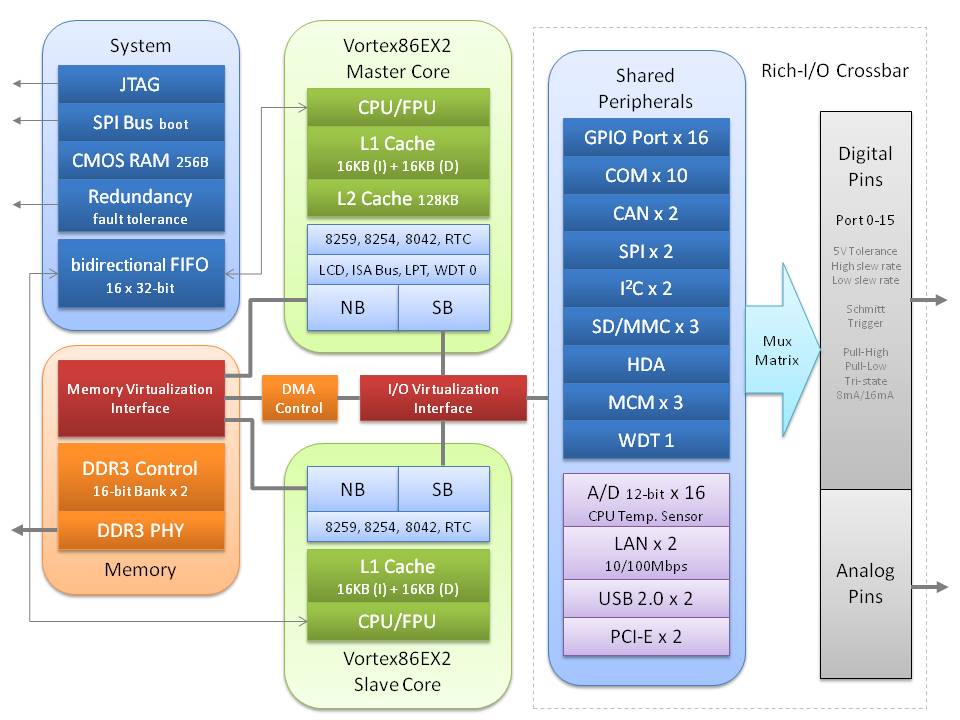
This year I got a chance to acquire one of the first DM&P Vortex86EX2 SoC based system (ICOP VEX2-6427-5C4NE specifically). Comparably to my article about DM&P VortexDX3 SoC, I assembled the short article with the information which I had gathered from sources like dmesg, /proc/cpuinfo (NetBSD, SparkyLinux),  datasheets, official web sources and images.


Below you can find the main Vortex86EX2 specifications (mainly taken from the official page, but supplemented by some information from BIOS and operating system messages, as well as hardware info):

  • Identified as DM&P A9133 in BIOS.
  • Master/slave design, two independent cores (as per my understanding, they cannot be used in the same Operating system at the same time).
  • CPUID is 0x38504d44 (not sure yet if only the master one only or both).
  • Frequency is up to 600MHz for the main core and 400MHz for the secondary one.
  • 6-stage pipeline (both).
  • 2x DMA controller (both).
  • Integrated FPU (both).
  • 16KB I-Cache, 16KB D-Cache (both), 4-way 128KB L2 Cache with write through or write back policy (main only).
  • DDR3 control interface, up to 2GB RAM, 16-bit data bus, 2 ranks, clock support up to 400MHz, supports ECC.
  • Real time clock (both).
Shared:
  • 65 nm manufacturing process.
  • HD-Audio (Realtek ALC262 is used in my system).
  • 2x USB 2.0 (ID: 6061) + USB device (PCI ID:1061).
  • ISA bus interface (PCI ID: 6013):
    • AT clock programmable.
    • 8/16 Bit ISA device with Zero-Wait-State.
  • Up to 3 SD/MMC cards (my board has one on the SoC module and one on the board). Supports SDSC, SDHC and SDXC. eMMC is also supported, up to version 5.1.
  • 2x CANbus 2.0A/2.0B.
  • 2x SPI controller.
  • Up to 10x COM ports.
  • 2x Fast Ethernet (10/100Mbps), my board has 1xR6040 model 6.
  • 3x Motion Control Interface.
  • Crossbar interface.
  • 128 programmable I/O pins (GPIO).
  • Temperature sensor.
  • Package: 19x19mm, LFBGA-441.
  • Operating temperature -40 to 85℃.
Vortex86EX2 System Block Diagram
Vortex86EX2 Specs and Block Diagram

According to /proc/cpuinfo CPU supports CMPXCHG8B, CMOV, FXSAVE/FXSTOR instructions, MMX and SSE, SSE2 and SSSE3 extensions, even NX bit (using PAE?), thus seems to be the most advanced DM&P SoC in this regard. It also supports page size extension (4MB), physical address extension (PAE),  SYSENTER/SYSEXIT instructions and time stamp counter. Because of above it can be likely classified as i686-compatible CPU (it loads i686 Linux kernel successfully). FPU is built-in on both cores. It does not have integrated GPU, thus external is needed (company is offering Vortex86VGA mini PCI-E card solution). My board has 4 USB 2.0 ports, but two of them provided by Genesys Logic's GL850G hub controller (USB ID: 0x0608). Additional information also can be found in CWID report in cpu-world.com (report has apparently incorrect halved cache sizes). /proc/cpuinfo can be found below.

/proc/cpuinfo (combined from NetBSD 9.99.69/Sparky Linux 4.19.0-6-686):

processor    : 0
vendor_id    : Vortex86 SoC
cpu family    : 6
model        : 0
model name    : Vortex86EX2
stepping    : 2
cpu MHz        : 600.032
physical id    : 0
siblings    : 1
core id        : 0
cpu cores    : 1
apicid    : 0
initial apicid    : 0
fdiv_bug        : no
f00f_bug    : no
coma_bug    : no
fpu        : yes
fpu_exception    : yes
cpuid level    : 3
wp        : yes
flags        : fpu pse tsc msr pae cx8 apic sep pge cmov pat mmx fxsr sse sse2 nx cpuid pni ssse3
bogomips    : 1200.06
clflush size    : 32
cache_alignment    : 32
address sizes    : 36 bits physical, 32 bits virtual
power management:


CPU-Z 1.94.0 screenshot
(through wine, L2 is not detected properly)

Note: There is no way to boot into slave CPU on my board, so all actual information is based on master one.

2020-02-29

2019 in review


Starting last year I resumed writing yearly review after a long break. Since 2019 was no less active in various personal computer related projects, I believe it may start a tradition of such retrospective reviews for the years to come. So without further ado, I will move on the last year's activities.

Downgrade from Radeon RX 460 to Radeon R7 370

For almost two years, I used the AMD Radeon RX 460 GPU based Asus Dual RX460 OC edition graphics card. However, since 2019, I started using NetBSD much more regularly alongside with Manjaro Linux (which is still my primary OS) and, unfortunately, Radeon RX 460 GPU is unsupported by the former. Because of that, I decided to downgrade to an older generation hardware, so I can be comfortable in using them. After a broad research, I opted for the GIGABYTE GV-R737WF2OC-2GD which is a Radeon R7 370 based card. R7 370 uses Pitcairn Pro GPU core based on the 1st GCN architecture. The main motivation behind choosing this specific model was its similar performance to RX 460, its reasonable price and its availability in stock at local stores.

Despite some fears, the card didn't disappoint. NetBSD immediately recognized the GPU and applied proper drivers giving the expected hardware acceleration. Because of this, I started using NetBSD on my desktop quite regularly. To my surprise, it visually felt more responsive than RX 460 on Linux as well. Despite being an older model, its performance is actually at par with the replaced card in general usage, except possibly increased power usage.

Dell QLogic 57810 10G Ethernet card

Since my router supports one SFP+ 10Gbit Ethernet port, I was curious to try it out and bought the Edimax EN-9320SFP+ 10Gbit network card back in 2018. Though, being the cheapest 10Gbit solution at that time with the smallest card around, it had few annoying flaws. The card was based on Tehuti TN4010 NIC, which is poorly supported by the alternative operating systems except Windows. Any of the BSDs don't have a driver at all. Linux has one, but not in the mainline kernel. Thus, the Linux driver needs to be compiled and installed manually, and the process needs to be repeated almost after every kernel update (which happens relatively often). In the end, the Linux driver still had at least one issue - if computer goes to standby mode, NIC stops working after resume with only reboot bringing it back. Nevertheless, I was not planning to replace it, since alternatives were too expensive (especially Intel based solutions). Btw, Edimax also have never updated the driver in their page, I was using the one from github.

Unexpectedly though, one local shop offered Dell QLogic 57810 (Dell part 540-BBGS) dual port 10Gbit network card for a sizable discount. I checked that it was supported by at least FreeBSD, the Linux kernel had mainline kernel driver as well, so I took the bait and bought it. The card itself is much bigger than Edimax, having an active cooler and requires PCI-E 2.0 x8 slot instead of PCI-E 2.0 x4. On the other hand, it is a way more professional product having sophisticated firmware and two SFP+ ports. Once installed, it worked out of the box in Windows, Linux and FreeBSD, with no manual work required. Contrary to Tehuti NIC, it had no issues on resume in Linux as well. In general, I believe this purchase was pretty successful, except the fact that it is not supported by NetBSD.

I dream to port the FreeBSD driver to NetBSD, however, it may be too complicated task, since the driver is huge. Nevertheless, I am planning to make an attempt this year (sometime in 2020) and see what happens.
Dell QLogic 57810 dual SFP+ Ethernet controller

Toshiba MG04ACA600E and D-Link DGE-528T

Yet another hardware update was already extensively described in my blog. Though, the main goal was just to upgrade from 3TB hard drives to 6TB ones in my NAS server, it ended up with the bigger project from migration to Artix Linux to LVM RAID configuration on recycled 3TB drives.

The new hard drives were two identical Toshiba MG04ACA600E model drives which showed quite visible performance improvement in read operations but write speed seemingly was restricted by driver issues and showed only minimal improvement compared to older drives. Thanks to LVM RAID0 setup I also reused older 3TB drives as additional back-up storage.

Realtek RTL8169SC based D-Link DGE-528T network card was used to circumvent loss of the second Ethernet port. Together with integrated Realtek 8111C NIC it showed worse network speed over Intel based daughterboard card, but it was expected and acceptable downgrade.

Toshiba MG04ACA600E

Sanwa MA-TB41S trackball

For around ten years I was successfully using Kensington Optical Orbit trackball. It was bought in Sweden by my former colleague and friend. Initially I thought that it will stay only as an experiment, but proved to be one of the best devices I've ever used. Unfortunately, the right button started to fail so badly by the end of the last year, that I was finally forced to look for the possible alternative. Despite pretty limited trackball options, I must admit it was one of most challenging decisions on hardware selection process. The main reason for that was the lack of possibility to try them physically. I believe, there is a great risk of to buy uncomfortable trackball from the images only. It doesn't matter how much reviews you will read, there are too many factors which can affect the comfort, from your hand size to device quality and sensitivity. That is probably the reason why you can find so many contradicting opinions on the same product.

Theoretically I could even buy the same model, since Kensington is still selling it together with few other long-living models, but I wanted to find one with the scroll wheel. After long research I narrowed down the options to these three models:
Though, Sanwa trackball was my last choice, I ended up buying it because of difficulty to find Elecom model in Europe, and relatively bad reviews regarding the quality of Kensington trackball buttons. Unfortunately, I can't tell yet if I made a right choice... During, the first month I was really disappointed. The trackball appeared to be a bit too big for my hand, making it difficult to reach buttons comfortably. Quite often I was accidentally moving the ball before clicking mouse buttons, thus easily missing intended button or other UI element. Scroll wheel was too slow, too big and clunky. My hand was constantly getting tired. Nevertheless, I started to get used to it over the time, thus decreasing the strain of the hand and increasing precision. Though, the scroll wheel still stays as the biggest inconvenience, since it was the major feature I had been looking for. It works, but scrolling is very slow and reaction time after rotating the wheel visibly lags behind. Furthermore, my thumb gets painful and tired easily, even over the time I haven't really gotten used to it. Honestly, I am not sure, if I will keeping using it, I may switch to a regular mouse or try the Kensington Orbit trackball with the scroll ring. It is probably the most unsuccessful hardware purchase in 2019.

NetBSD

I was quite active in the NetBSD project community this year: I managed to port IC Plus IP1000/1001 PHY driver from OpenBSD (used by many VIA EPIA boards, also IC Plus own network cards), fixed support for VIA VX800 (and possibly VX855, VT8237S) SATA controller (previously partially working in IDE mode only), 4World USB to Serial adapter (already mentioned in 2018 review), found the fix for the Biostar X370GT5 SATA controller locking issue, requested to pull-up the fix for D-Link DUB1312 USB network card to NetBSD 8 release. In addition, I noticed and identified the applied fix for the long standing bug on Ryzen system, where the OS was failing to identify a second SATA hard drive. This bug was causing to stall even UEFI POST process on reboot. Fortunately, this fix made it into NetBSD 9.0 release. Also I noticed some typos and white-space issues in the code. Finally, I updated the seemingly abandoned Codelite IDE package in pkgsrc to build the latest stable version at that time (from 9.1 to 13.0). Despite these successes, I also had some let-downs. I couldn't fix the USB and Ethernet issues on eBox 3352DX3-AP computer. I found a workaround to make Ethernet controller work, in case SMP and ACPI is disabled, but the proper fix is still unclear. Besides that, once suddenly Fnatic Gear Rush keyboard stopped working, with the help of NetBSD developer I identified that it was caused by accidental switch to 6KRO mode. It appeared to be working in NKRO mode only (which was the opposite up to NetBSD 7.1 release). Hopefully, it can be fixed to work on both modes in the future. Seeing quite a successful last year, I hope that I will be able to solve some issues in 2020 as well.

eBox 3352DX3-AP 

The last chapter I will dedicate to some insights on how to run BSD system on eBox 3352DX3-AP VortexDX3 based system, since I promised that on the last review.

FreeBSD 12.0 works the best out of BSDs, which can perfectly boot on default BIOS configuration. The only issue is the integrated network controller (R6040) which fails to work. This issue is common to all BSDs, since drivers are based on FreeBSD one. Similarly to the described below workaround on NetBSD, it may be also applied for the FreeBSD. By removing all the vte_reset() calls in the driver and recompiling a custom kernel, it should make the network work. Unfortunately, the latest release at time of writing (12.1) introduced some regression which causes instant failure on boot. I submitted the bug report but I don't expect it to be resolved soon. So, in case FreeBSD is a preferred choice, I recommend to run 12.0 release. Alternatively to editing and compiling the custom kernel, USB based network controllers can be used to enable the network.

OpenBSD is probably on the worst situation. I identified only one way to boot into the system without kernel recompilation by disabling "ACPI aware OS" option in BIOS. However, neither USB nor Ethernet works, which renders the system usefulness limited to some local automatic jobs only. It can boot with ACPI enabled/IDE in legacy mode by recompiling kernel without DIAGNOSTIC option. SMP works in both cases. If you want to work with OpenBSD for any reason, I would recommend to look for the system with COM ports (or try to solder the one).

NetBSD support is somewhere in the middle among the three. In order to boot the system with "ACPI aware OS" option enabled in BIOS, IDE should be set to "legacy mode". Otherwise, various timeout exceptions will occur and system will fail to boot. Similarly to OpenBSD, neither USB nor network will work in this case but both CPU cores (SMP) will work without requirement to rebuild the kernel. Booting with ACPI and SMP disabled (boot -12) will give USB support. Furthermore, it is possible to make network work in this case as well, but removing vte_reset() calls in if_vte.c (R6040 driver) and rebuilding your custom kernel. In case loosing SMP and ACPI are acceptable options, it makes a fully working system. Unfortunately, a workaround for the network didn't work for OpenBSD (more specifically, it actually does work, but network still fails to connect due to some other issue).

Summary and 2020

2019 was a pretty good year in the hardware/software context. Most of my projects went smoothly, and newly acquired hardware met or even exceeded expectations (except the trackball). It was also the most active year in NetBSD for me. Besides starting using it as Desktop operating system quite regularly, I managed to provide several patches to improve hardware support and provided my first contribution to pkgsrc project. I hope to keep this pace in 2020 as well, though time-constraint is my main enemy. Hardware wise, I don't have specific plans for 2020. I may upgrade to a newer Ryzen CPU and upgrade some other parts but non of these are a high priority. Like last year, such decisions probably will depend on pricing and unexpected deals. I do plan to revive my Alpha CPU based Microway PC164 Screamer system and I already have bought "old new" 8x32MB modules of SIMM RAM (Samsung KMM53616000AK-6) for it. Considering all these future plans, I believe that I will write at least a few articles this year, which I hope will be an interesting read.

2019-04-16

Information on DM&P Vortex86DX3 SoC

DM&P Vortex86 SoC series are 32-bit x86 compatible CPUs which are pretty rarely seen outside embedded usage. Original Vortex86 was the same as SiS55x SoC based on Rise mP6 CPU but later designs diverged into the independent unrelated architecture implementations. Unfortunately, there is no information on how and if models are related to each other. Though some specifications are provided in the official page but some information is still left out, possibly accesbile on NDA basis only. At the time of writing this article, wikipedia page was incomplete, partially messy and possibly still incorrect because of the lack of verified sources, it didn't mention anything about EX2 model yet. Nevertheless some models are still produced and one can find solutions made by ICOP Technology or DM&P itself. Since I had a chance to buy Vortex86DX3 based EBOX-3352DX3-AP small PC system last year, I decided to gather and share some information on this SoC, part of it can be challenging to find. I've used several sources like CWID, dmesg, /proc/cpuinfo (NetBSD 8.99.x, SparkyLinux 5.7 with 4.19.0-4-686 kernel version), various datasheets, pages and images.

Vortex86DX3 specifications (mostly from official page, PCI IDs from NetBSD dmesg):

  • DM&P A9126 in BIOS
  • CPUID 0x36504d44
  • Dual-core
  • ~1 GHz frequency
  • 6-stage pipeline
  • 40 nm manufacturing process
  • integrated FPU (1 per core, 2 in general)
    • Implements ANSI/IEEE standard 754-1985 for binary Floating-Point Architecture
  • 8-way 32KB I-Cache, 8-way 32KB D-Cache, 4-way 512KB L2 Cache with write through or write back policy
  • DDR3 control interface, up to 2GB RAM, 32-bit data bus (it runs at 667MHz in my system)
  • Integrated graphics (2D acceleration only), RDC semiconductor (vendor 17f3) PCI ID: 2015.
    • UMA architecture
    • VGA controller
    • 2D Graphics engine support
    • Max display resolution 1920×1440@60Hz with 234MHz video clock
    • Dual Display support: only one display can be 1920×1200, 1 DVO (24bits) & 1 D-SUB or 2 DVO (12bit x 2)
    • Supports H.264 1080P video decode 
  • HD-Audio (Realtek ALC262 is used in my system)
  • Embedded 2MB Flash for BIOS storage
  • ISA bus interface (most likely R6035, RDC semiconductor (vendor 17f3) PCI ID: 6035)
    • AT clock programmable
    • 8/16 Bit ISA device with Zero-Wait-State
  • IDE Controller, R1012, RDC semiconductor (vendor 17f3), PCI ID: 1012.
    • 2 IDE or 2 SD cards
  • 1 port SATA I (1.5 Gb/s)
  • Package: 31x31mm, 720 Ball PBGA
  • Operating temperature -40 to 85


CPU supports CMPXCHG8B, CMOV, FXSAVE/FXSTOR instructions, MMX and SSE extensions (no SSE2 or above). It supports page size extension (4MB) and time stamp counter. Because of above it can be probably classified as i686-compatible CPU (it loads i686 Linux kernel successfully). It does not support physical address extension (PAE), but considering maximum 2GB RAM limitation it is not needed. Due to lack of SSE2 and above extensions it may be challenging to use it as a desktop system (all moderns browsers require SSE2 by default, however SSE only build of palemoon browser can be still downloaded manually). /proc/cpuinfo information marks CPU affected by Meltdown, Spectre v1, v2, v4 (speculative store bypass) and even L1TF vulnerabilities but actually it may not be vulnerable to at least some of them, since Linux does that on precaution, not on actual testing results. FPU is built-in. It also has integrated GPU without any 3D acceleration. SoC also supports 1xSATA I, 2xIDE or SD cards, USB 2.0, Fast Ethernet (10/100), PCIe bus, integrated 2MB flash for BIOS, SPI. Additional information also can be found in CWID report in cpu-world.com (report has apparently incorrect halved cache sizes). /proc/cpuinfo can be found below.

/proc/cpuinfo (SparkyLinux 5.7):

processor    : 0
vendor_id    : Vortex86 SoC
cpu family    : 6
model        : 1
model name    : Vortex86DX3
stepping    : 1
cpu MHz        : 1000.051
physical id    : 0
siblings    : 1
core id        : 0
cpu cores    : 1
apicid        : 0
initial apicid    : 0
fdiv_bug    : no
f00f_bug    : no
coma_bug    : no
fpu        : yes
fpu_exception    : yes
cpuid level    : 3
wp        : yes
flags        : fpu pse tsc msr cx8 apic sep pge cmov mmx fxsr sse cpuid
bugs        : cpu_meltdown spectre_v1 spectre_v2 spec_store_bypass l1tf
bogomips    : 2000.10
clflush size    : 32
cache_alignment    : 32
address sizes    : 32 bits physical, 32 bits virtual
power management:

processor    : 1
vendor_id    : Vortex86 SoC
cpu family    : 6
model        : 1
model name    : Vortex86DX3
stepping    : 1
cpu MHz        : 1000.051
physical id    : 1
siblings    : 1
core id        : 0
cpu cores    : 1
apicid        : 1
initial apicid    : 1
fdiv_bug    : no
f00f_bug    : no
coma_bug    : no
fpu        : yes
fpu_exception    : yes
cpuid level    : 3
wp        : yes
flags        : fpu pse tsc msr cx8 apic sep pge cmov mmx fxsr sse cpuid
bugs        : cpu_meltdown spectre_v1 spectre_v2 spec_store_bypass l1tf
bogomips    : 2000.04
clflush size    : 32
cache_alignment    : 32
address sizes    : 32 bits physical, 32 bits virtual
power management:

DM&P Vortex86DX3
DM&P Vortex86DX3 SoC