Showing posts with label Mikrotik. Show all posts

2022-08-22

Switch to QNAP QXG-10G2SF-CX4 network card

In the last year's review I mentioned about my plan to switch to QNAP QXG-10G2SF-CX4 dual port SFP+ PCIe Gen3 x8 network controller from the Dell 540-BBGS one. The QNAP card is based on Mellanox ConnectX-4 Lx controller, which NetBSD support was the primary reason for the replacement.

Since I have already tested this card on my main machine using Manjaro Linux and NetBSD (which even led to one NetBSD specific bugfix), I was expecting a simple drop-in replacement (I use Artix Linux in my NAS server currently). Unfortunately, it wasn't meant to be, I faced two worth to mention issues.


Dell 540-BBGS and QNAP QXG-10G2SF-CX4

The non-standard LED positions

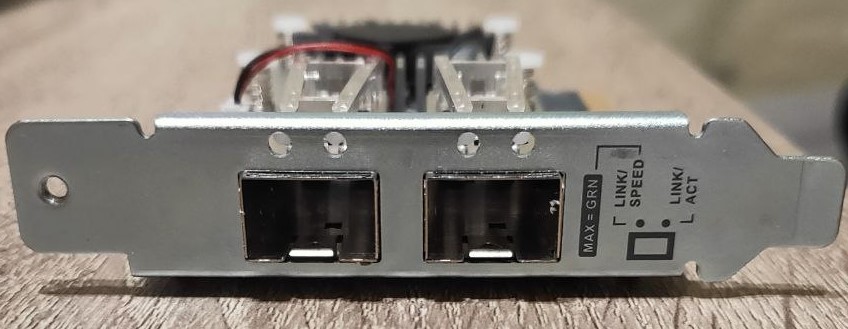
The first issue is related to non standard LED indicators' positions. Instead of being placed on the side of the ports, they are positioned on the top of the card. Because of this, lights are completely blocked once the card is installed. It is due to the fact that the QNAP card is designed for their own NAS devices, not for normal PCs, where likely those indicators are visible. I am personally not using LED indicators often, but it may be an issue for others. I believe it may be resolvable by drilling holes in place of LED's positions, however I left it unresolved this time (there are 4 LED lights, activity and speed indicators for each port).

In addition to that, I got confused with the low profile brackets. Two of them are included in addition to full size bracket: one is standard PC style bracket, another seems to be either QNAP or some server specific. Since I replaced low profile bracket with full size one to attach it to my main PC, I got surprised by the one I found in the box upon the switch: 1) it is not bent on the "upper" side to fix it to the case 2) it has a small hole for the screw instead of the groove in a bit lower position in comparison. I forgot, that it was also a standard low profile bracket in the package (which I didn't put back to the box), instead I used QNAP specific one. Since my case uses a hinge to fix attached cards instead of screws, I drilled a small hole on this hinge aligned with bracket's hole and used a screw to fix the card. Once I realized that I have low profile bracket for a normal PC, my setup was already complete...
QNAP QXG-10G2SF-CX4 network card with the low profile bracket
QNAP QXG-10G2SF-CX4 with the QNAP specific low profile bracket
Unsupported Mikrotik S+DA001 DAC cable

I do have two types of DAC cables, one is Mikrotik S+DA001 1 meter SFP+ cable, others are Ubiquiti UniFi UDC-3 3 meters cables. I used a mix of one Mikrotik and one Ubiquiti cables in my NAS , since the third one was attached to my main computer. This arrangement was required, because 1 meter was too short to reach my main computer from the switch device, however it could reach the closer placed NAS server. This cable worked well with all my previous network cards, even if Dell was showing warning regarding unsupported modules. Unfortunately, QNAP network card refused to work with it at all and showed an error instead: "port_module:249:(pid 0): Port module event[error]: module 0, Cable error, Unknown identifier". Thus, it is advisable to use either officially supported cables or make sure about their support in the community. Luckily, Ubiquiti cables are supported and work without any warnings. I needed to buy one more Ubiquiti cable to resolve the issue, which costs a bit over 20 euros for 1 meter cable with the price gradually increasing for the longer ones (up to 3 meters).

Summary

If blocked LED indicators are not an issue, the careful cable/module selection is the only important concern before buying this card. Otherwise, the card works well on all major operating systems out of the box without additional firmware packages needed. Software wise it didn't require any configuration changes, since interfaces are named by generic eth0/eth1 names in Linux, same as the Dell card. I only needed to update my MAC address in the router to make sure that the same IP address is assigned by DHCP server. This network controller also enables me for the potential transition to NetBSD in the future, and I do plan some initial testing later this year. Depending on the delayed NetBSD 10 release schedule, the final switch won't likely happen until the middle or even end of the next year though (in case of successful testing). Finally, I plan to add few iperf3 test results in next week or two, but I do expect similar results to the Dell card.

QNAP QXG-10G2SF-CX4 network card
QNAP QXG-10G2SF-CX4

2021-05-24

2020 in review

The beginning of 2021 was very difficult for me and my family. In January I unfortunately lost my father because of COVID-19. This deeply wounded me, but at the same time it was a special and unforgettable moment for us, because my second daughter was born just a few days later, four days to be exact. All of this diverted my focus from IT for a while. Despite that, few months later, I would like to keep tradition to write a yearly review, even if it is late. In 2020 I had some projects like new NAS setup and 10Gbit network hardware. In addition, I also bought ICOP VEX2-6427-5C4NE board which was one of the first DM&P Vortex EX2 SoC based solutions in the market.

ICOP VEX2-6427-5C4NE

VEX2-6427 was one of the first publicly announced boards based on the DM&P Vortex86 EX2 SoC, which intrigued me a bit due to its unusual main/secondary two-core design. In addition to that, I was expecting that it may help me to resolve R6040 Ethernet issue on BSD systems for my other VortexDX3 system. Finally, I was hoping to use it as small firewall system. Unfortunately, it was not meant to be. There were several reasons for that:

  • the BIOS is based on SeaBIOS without ACPI support. Initial firmware didn't have any user interface. Though ICOP support provided me a BIOS update with UI configuration, I needed to buy miniPCIe graphics card in order to update and utilize it (I bought IEI IGCME-1300-R10, since it was much cheaper than DM&P VortexVGA solution, mainly due to shipping costs. Also Aspeed AST1300 is theoretically supported by NetBSD, though I haven't tested that yet Update: no, AST1300 does not seem to have DRM support in NetBSD).
  • The secondary CPU core is not accessible in this board, thus defeating the purpose of the unique SoC design.
  • Due to limited CPU performance, PCIe bandwidth is also limited. My original plan was to use 1 Gbit Ethernet on mini-PCIe card, but it failed to meet my performance expectations (usually transfer speed was way below 200MBit/s with Intel or Realtek controller). Similarly mini-PCIe SATA card was also under-performing compared to modern PCs (if I remember correctly, SSD was reaching up to 50MB/s reading performance, way below its capabilities on the modern platforms).
  • Due to different R6040 PHY model and lack of ACPI support, I couldn't utilize it much to investigate DX3 SoC issue. On the other hand, it worked well on NetBSD without any modification. I submitted a patch to recognize new PHY model but even general PHY driver worked as well.
  • NetBSD required manually to fix COM IRQs in the kernel configuration to boot into the system because of IRQ conflicts. Initially between USB and serial port, but later with some miniPCIe cards too. Only with the updated firmware, I was finally able to reassign IRQs to my own needs. Nevertheless, to utilize all COM ports, manual kernel is still needed (similarly, Linux also requires some bootloader configuration changes to properly support all serial ports, if needed). 

I also stumbled into stability issues, however it appeared to be caused by my own mistake. Apparently, PC sets serial port TX signal to 0V during PC boot and it triggers the peer to go to the debugger. In order to resolve that, hw.cnmagic=+++++ needs to be added to /etc/sysctl.conf as a workaround (cnmagic(9)). The signal does not trigger debugger in this case. Because of all these reasons, grand plan for the system ended up unfulfilled. Nevertheless, I am still planning to use it as a serial terminal between different systems and possibly as local pkgsrc packages storage to keep it busy.

During this time I submitted patches to identify new CPU ID and new devices, thus NetBSD should be more verbose about those and attach rdcpcib (PCI-ISA bridge) driver with more DM&P SoC models.

Despite the board failing to meet my expectations, I was pleasantly surprised with ICOP support. It was very prompt, professional and helpful. Would I need to do some professional embedded hardware business, I would be really happy to deal with this company.

ICOP VEX2-6427-5C4NE
Assembled VEX2-6427 board with SanDisk X110 SSD and Delock miniPCe Ethernet

Mikrotik 10 Gbit router

Last year I was slowly moving to 10 Gbit internal network, connecting my NAS, router and main PC, as well as some other devices from time to time. For that purpose I bought a Mikrotik CRS309-1G-8S+ switch. It has 8 SFP+ ports and one 1Gbit port, as well as one serial port. The size is pretty compact, it uses passive cooling with external radiator connected to CPU using heat pipes. The switch is based on dual-core Marvell 98DX8208 800MHz ARMv7 CPU. The device is relatively cheap, but the price has some trade offs: though it is packed with quite a bunch of features, CPU is not very powerful do handle something more than simple configuration. Thus, I also didn't spend much on setting it up beyond bonding interface for my NAS server. Of course, I followed the security advice from their own page to have at least basic protection for the switch itself, but I guess that's it. Also, I've read somewhere that it is not recommended to use RJ45 modules, since they tend to emit lots of heat and may cause SFP+ cage to overheat. It is a bit of a disadvantage with the increasing RJ45 10GBit solutions (myself I am using DAC and fiber cables only) but likely can be partially overcome by custom cooling solutions. The major issue was initial connection to the switch, since even 1Gbit port wasn't configured as DHCP client, making it really challenging to reach from the internal router network. Hopefully, I could access it using serial port, but it took me a while to understand how to configure 1Gbit port to get IP address from my router. Afterwards, it was pretty easy to setup, including enabling web interface. Network aggregation configuration wasn't very intuitive as well, but trial/error approach worked eventually. I good part that Mikrotik RouterOS is updated pretty frequently. There is a choice between stable/testing/development and event long term releases. Thus, updates are the only reason I am connecting to this device.

CRS309-1G-8S+IN
MikroTik CRS309-1G-8S+IN

Asus XG-C100F

Asus XG-C100F became my third 10GBit SFP+ network adapter. Previously acquired Edimax EN-9320SFP+ and Dell QLogic 57810S are not supported by NetBSD, because of this I couldn't use them in my desktop system. Only Dell card is supported by FreeBSD but the driver is huge and I gave up on trying to port it pretty soon and repurposed it to Linux based NAS system later. Tehuti 4010 based Edimax is not supported by any of BSDs, though PRs for FreeBSD were submitted by the company. I believe it would have been easier to port, would it be accepted, but time constraint forced me to choose easier path with Aquantia based controller. On the time of purchase, the driver was just recently introduced into current branch, eventually it was back-ported to netbsd-9 branch with 9.1 release. On arrival, the card wasn't supported out of the box, since adapter's specific AQC100 MAC controller wasn't yet included in the driver list. Adding device ID made it to be recognized by the driver, but every reboot required to reattach the cable to make it work, which obviously was quite inconvenient. Fortunately, the solution was found quickly by Ryo Shimizu. Thanks to him, adapter is working without any issues now, except that I need to work on some configuration to optimize performance. It is not on par with Linux, especially on uploading which seems to be capsized to 1Gbit for some reason. It is a future project which I will try to base on NetBSD documentation and/or help in the mailing lists and IRC. During that time Linux driver also had a small bug, which was reporting TP (twisted pair) as supported port instead of FIBRE. I submitted a bug, it was fixed pretty soon after (however, it was likely discovered independently from my bug report). Besides that, adapter works well both in NetBSD and Linux, but the latter shows much better performance by default. I am not sure about the current state of OpenBSD and FreeBSD support, it was lacking from default kernel in both the last time I checked. FreeBSD likely has a vendor provided driver, OpenBSD one is in development I believe. 

Asus XG-C100F
Asus XG-C100F

NAS project

Following upgrade to 10Gbit network and increasing issues with the Marvel based SATA controller on ADPE4S-PB daughterboard, I eventually decided to upgrade my NAS computer from Jetway JNF76 to much more modern Biostar FX9830M motherboard. I described the process pretty well in my blog towards the end of 2020, thus I won't be repeating them here. However, there are few negative notes which came up over the time. I had at least one overheating issue, once I tried to execute long running software building process. Also, I can't call the system very silent, maybe due to pretty confined environment it is currently placed, but it has a constant background noise. It's not annoying but it is consistently audible. Finally, my active hard drive (non backup one), which is placed at the bottom of the case, seems to operate on quite high temperatures. Because of that, I may need to work on better cooling soon, especially since summer is just around the corner. I believe, even putting the computer on some elevated support may help with that. Other than that, it serves me well, as the system itself is stable and solid. Hopefully, I will manage to improve cooling and noise issues over time to avoid potential hard drive failures.

Biostar FX9830M
Biostar FX9830M

Smaller purchases and projects

Most smaller purchases last year were related to failed ICOP project, thus some hardware is unused now. As mentioned previously, IGCME-1300-R10 miniPCIe graphics card was used only to update BIOS and readjusting its settings. For testing purposes I successfully booted MX Linux distribution with it. I also bought two miniPCIe Ethernet cards. One is Realtek 8111F based Delock 2x1Gbit low profile card and one more unbranded Intel i350 based card. Delock has a disadvantage in taller pin type connections, while Intel based one has flat cable between miniPCIe card and backplane card with Ethernet connectors. On another hand, Delock cables are more flexible compared to thick Intel one. Unfortunately, I can't comment much on their performance, since both were performing similarly because of limited board's PCIe bandwidth. If I would have connected ICOP support before buying second card, I wouldn't have bought it. Initially I believed that poor performance is a Realtek controller issue, but it wasn't the case.

IEI IGCME-1300-R10

I also bought a miniPCIe 2xSATA controller (ASmedia ASM1061 based) and SanDISK X110 32GB SSD as a main storage, since SD cards were seemingly limited to very poor I/O performance. I used 2xUSB to SATA 15 pin power cable to power up the SATA SSD itself. This solution worked pretty well but, similar to Ethernet card read/write performance was quite limited. Nevertheless, it still was a tangible improvement over SD cards. I was pleasantly surprised that VEX2-6427 board supported direct booting from this SATA controller, thus SD card was not needed after upgrade.

I also had a chance to buy 8xKMM53616000AK-6 FPM parity SIMM memory modules with the hope to revive Microway PC164 Screamer Alpha board. However, it appeared to be either board or CPU issue. Memory was recognized but nevertheless board was spitting lots of errors on boot. Due to time constraints I abandoned attempts to revive the system for now.

One more small project was triggered by the death of my old FORTRON EPSILON 600W PSU last year. Luckily, I had one more PSU available in my stockpile (non modular), previously used in AMD Opteron 3280 based system, thus I decided to switch to it instead of buying a new one. Unfortunately, its cables were not designed for bottom placement, and most of them were too short to reach their designated connectors on the motherboard. Conveniently, all required extensions were available for purchase in local stores. For 24-pin power and 6-pin GPU cable extensions I bought SilverStone PP07-MBR and PP07-IDE6R red cables. These are extremely nice with individually sleeved wires for protection. For 8-pin power extension cable I acquired simpler Delock 83342 extention cable. Besides solving the short cables issue it also helped me organize them better, since I could utilize case design by wiring them through the right part of the case.

Finally, by the end of the year I bought the Clockwork DevTerm A04 Kit. It will be my first ARM based computer, but its current proposed shipment date is on early June, which is a slight delay since initially it was supposedly to be shipped by the end of March 2021. Hopefully, no more delays will occur but with this current shortage of microelectronics everything is possible. Nevertheless, I feel excited about it and I hope it will become a very useful device.

NetBSD endeavors

Besides mentioned patches for DM&P SoC and related RDC devices, last year wasn't very fruitful for me. R6040 PHY issue on VortexDX3 didn't move forward and I don't expect to work on it this year as well. I have reported some typos, submitted a patch to properly identify VIA PHY with MIIVERBOSE option, fixed small dmesg issue for viadrmums driver (actually reported last year and fixed this year), submitted a bug report on auvia(4) audio device driver, which also was affecting some other audio devices, also had some discussions leading to one bugfix for VIA PadLock engine, updated CodeLite package in pkgsrc to 14 version (and this year to 15). Over the year I attempted to work on porting bxe(4) driver from FreeBSD, but abandoned it, since driver is way too big and my skills on such work are too limited. I've also started some work on improving unfinished unichromefb driver with hopes to progress more this year (but no promises). This year I don't expect to do much as well but the usual bug reporting, small fixes and typos, pkgsrc package updates/fixes are expected. Just recently I updated to NetBSD 9.2 release!

Besides NetBSD I also contributed to Kwort 4.3.5 release which I use irregularly on one of my testing machines. Mainly it contributed to installation process improvements. It is really nice and very minimal CRUX Linux based distribution. Give it a try! I also reviewed previous 4.3.4 version last year.

Summary and 2021

The highlight of 2020 was local network upgrade to 10GBit leading to various new hardware and upgraded NAS system. Interesting and unusual DM&P VortexEX2 based system mainly ended up as a playground last year with some expectations to utilize it more this year. Finally I made a first step to ARMv8 world with Clockwork DevTerm device, which will hopefully arrive pretty soon. In 2021 I already had quite a few purchases. I upgraded my main CPU from Zen to Zen 2. I also updated my mom's computer to ASRock DeskMini X300 with Athlon 200GE CPU. I gave my wife a Pocketbook InkPad Color 7.8'' e-reader as a birthday gift. Finally, I bought multifunction HP LaserJet Pro MFP M183fw printer. All of these devices a worth to be mentioned in the next year's review, but may also have dedicated articles if time permits.
ASRock DeskMini X300
ASRock DeskMini X300 and AMD Athlon 200GE
 
In meantime I wish you all to stay safe and healthy during this difficult period.

2020-11-12

The final NAS setup

This is a follow up article to my previous post on the NAS upgrade to the Biostar FX9830M motherboard. As soon as I received all required components, I spent the first available evening to assemble the new setup. As mentioned previously, I decided to utilize my old InWin BM639 case instead of buying a new one to save the costs. In the end, I believe, it may even stay as a permanent solution, since I am pretty satisfied with the end result. My final setup is:

Dell 540-BBGS 10Gbit SFP+ network adapter

Motherboard placement to the case

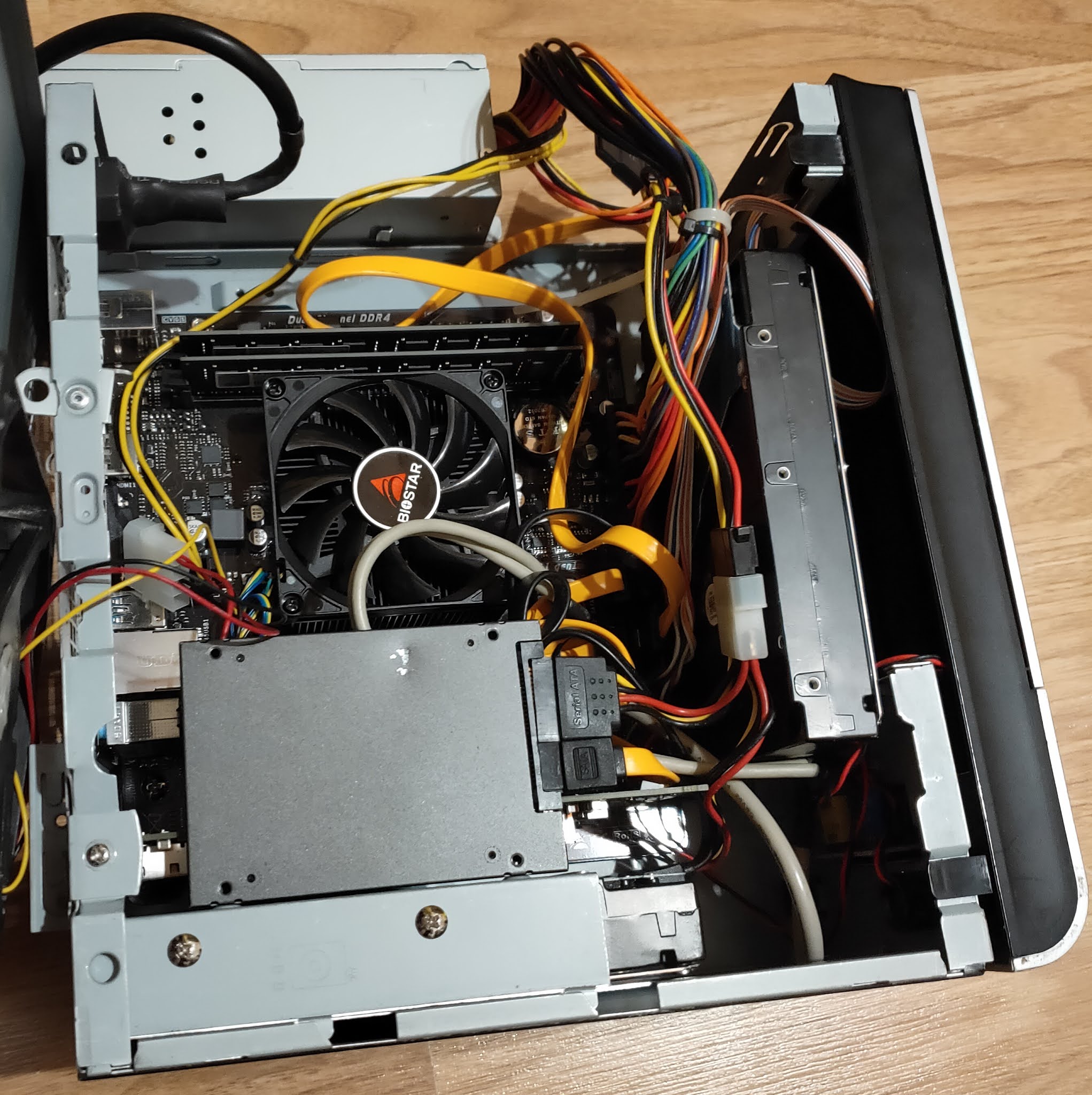
I hit the major obstacle as soon as I tried to place the motherboard inside the case. It is 1.3 cm wider than mini-ITX/mini-DTX standard, thus it was hitting internal PSU. The case hadn't enough space in between to fit. Fortunately, it provided an option to remove just the top part of the case, which gave me an opportunity to exchange the PSU position on the top of the case instead. The stability of such placement comes from the fact that cables are connected pretty tight to motherboard and the PSU has a slide at the bottom by design, which allows to fix it at one corner of the case. It is a workaround and it is not the best solution definitely, but it works pretty well. Once PSU obstacle was solved, the motherboard fit in perfectly. PCIe interface occupies the second extension slot by design, thus only single slot cards can fit (though, by removing HDD cage, likely two slot low profile cards can be used). There are possible alternatives for PSU placement as well I believe to avoid the external placement, but they likely require some modifications to the case. I may investigate those options some time in the future.

Biostar FX9830M VER6.0 motherboard

Placing the hard drives

The second obstacle was to fit two 3.5'' hard drives and one 2.5'' SSD inside. By design it has one 3.5'' cage for HDD. Besides that, it was supposed to have the 5.25'' ODD cage as well, which occupies a big part of the front side of the case, however I likely lost it over the years (I replaced it with the big fan years ago). Because of this, I needed to think out of the box a bit on how to utilize space and, if possible, to avoid external placement. Regarding the SSD drive, I was initially planning to replace it with the Sandisk Extreme Pro 3.0 USB flash drive placed internally using USB 3.0 pin header, but it appeared that pin header is protruding too much to the left, thus hitting the CPU fan. What is more, I wasn't sure if flash drive is not too long vertically as well. Because of this, I decided to stay with Kingston SATA SSD. It had its own challenges because of physically damaged SATA port, but I successfully placed it vertically on top of 3.5'' cage by using holes designed to fix 2.5'' drive. Vertical position was required to avoid the bending of drive's SATA port by the rounded metal edge on the top of the HDD cage. Fortunately, this position wasn't obstructed by the network card as well, though it makes access to it a bit more complicated. The first HDD was placed in the cage itself as designed by the motherboard, thus it didn't pose any issues. Finally, I fixed the second hard drive on the original position of the PSU by fixing it with two screws on a back side frame of the case. Thus, all the drives were successfully placed inside the case, leaving only PSU outside of it. In theory, I still can even add one more drive on the front side instead of the front fan. It may affect the airflow inside the case though, because of this, such setup would need careful testing, especially in the summertime.

Toshiba MG04ACA600E 6TB HDD

As a side fact, two SATA ports are provided by the CPU chipset, another two by ASMedia ASM1062 controller. Non of them provide RAID support. Like I mentioned before, the second SATA port is also connected with the NVMe slot, thus only one of them can be used at the same time.

Network card needs low profile bracket

The final issue was caused by the fact that Dell network card wasn't supplied with the low profile bracket, though it is easily replaceable by the design (standard screws are used). Because of this, I needed to order one from the eBay, while placing the card without it temporarily. I was concerned if it would not easily pop out of the PCIe slot, luckily, however, it stayed very firmly in the position even during cable insertion/removal process.

The final arrangement can be seen in the picture below (before cable management):

Software adjustments

Software wise the Artix Linux didn't boot out of the box, but it was solved simply by recreating initial ramdisk environment, which had also been the typical way to resolve an unsuccessful update process in the past. To my surprise, the SSD drive worked very stable on the new system, despite its damaged SATA port. I didn't experience any boot issues, I could use all the HDD utilities like smarctl, hddtemp without causing system to stall! What is more, it finally utilized its full bandwidth potential, which was very noticeable during upgrade process. 

As initially planned, I replaced NetworkManager service with the dhcpcd and netifrc combination. It was a pretty simple procedure, since only /etc/conf.d/net file required few additional lines to setup bonding interface by the provided example. Once network was ready, I tested copying files between two systems with 10Gbit network, it reached around 165MB/s, which is considerably better than previous speed ranging from 40 to 70MB/s depending on network controller, but likely limited to hard drive capabilities. Because of this, RAID0 setup may be beneficial to increase download speeds even more, just it doesn't seem necessary for me currently. It is also easy to notice snappier file browsing experience. Additionally, I used iperf3 network testing utility which reached ~6.25 Gbit/s between two systems. 

iperf3 testing results

Finally, I could remove all the workarounds applied for the previous system, including enabling the kernel updates again.

BIOS 

The motherboard uses UEFI BIOS with the typical graphical setup controlled by keyboard or mouse. It does not provide as much options as as you may expect from usual desktop gaming motherboard, but it has some specific options which are likely suitable for a business environment and power users (TPM, security, virtualization). For my specific case, I probably mainly missed more controls over fan speed and other power saving features. The motherboard fan is usually very silent but can become noisy on high CPU usage. Also, I didn't find an option to disable main AUDIO device (Realtek ALC887) (except the one from the GFX device). Dell network card supports EFI, thus I changed Network device to prefer UEFI boot instead of legacy one. BIOS provides an option to choose boot device by clicking F9 or enter BIOS flasher with F12 (no BIOS updates are available as of yet). In general, it is still an improvement over old legacy BIOS in Jetway motherboard but may disappoint more demanding people.

I also made a mistake, once I disabled internal NIC controller. It changed link's enumeration number from enp3 to enp2 which I failed to notice initially, thinking it's a possible BIOS bug and reporting it to Biostar. Actually, only simple network reconfiguration was needed.

FX9830M BIOS main screen

Conclusion

In conclusion, the full upgrade process from the hardware side to the software one went quite smoothly. The motherboard proved to be almost compatible with the Mini-DTX cases, with the PSU placement being a major concern. In my case, I resolved it quite easily due to highly modular case design. The final result is considerably stable and faster system with the big potential to utilize it in few different ways, which were not possible previously. I still plan several improvements like data encryption and cold backup in the near future. I am also waiting for the low profile bracket for the network card and a low profile COM bracket which will occupy the upper empty slot (I use serial console in some occasions) to complete the setup. Considering the successful setup with the InWin BM632 case, I started to have doubts about the need of replacing it with Fractal Design Node 304 or similar case, as I initially envisioned. I believe, I will likely look into all other options first before doing such purchase. As of today, the main concerns are to reintroduce double backups, better secure the data and utilize the new system for routine actions which I am doing either manually or using scripts. And hopefully, the system will serve me no less than the one it replaced!

2020-10-27

NAS upgrade to Biostar FX9830M board

Intro

Despite my recent projects and various minor hardware updates on the old NAS server, which you can read about in my previous blog posts, I have been already looking around for the major hardware update. I was not sure how long the search will take due to reasons I will explain shortly but the aging system was being pushed to its limits and it was only a matter of time before stability, performance, requirements, and other factors will start to drift away from the reasonable levels. In addition to those factors, I was constantly upgrading my other hardware, including gradual upgrade to 10Gbit based local network. Better utilization of it outside simple technology playground and testbed,  were complementing motivational factors to spend additional resources on NAS modernization, which would allow me to focus on its main purpose instead of putting most of efforts for workarounds and patches just to keep it running reasonably well. 

Inside Jetway JNF-76 based NAS system

The search

The market changed quite a bit since the time I bought Jetway JNF76 back in 2009. Introduced by VIA Technologies mini-ITX form factor was still quite strong, various solutions were available ranging from home to industrial/embedded market. Specialized online computer shops selling such hardware were still in business. Once I started looking for the new board a year or so ago I noticed that most of the stores I've used to buy such products are either gone or their business transformed into different directions. VIA Technologies itself also generally left the consumer market and x86 CPU business (I know that they have joint venture in China, but those solutions have zero availability outside China and I don't associate them directly with VIA anymore. As a proof of that, just recently VIA announced plans to sell its part in the joint company). It's not that the market completely vanished, there are new stores which sell similar products in the sea of other stuff but they are not that focused and specialized as before. On top of that, ARM based solutions started to push into small PC market but I am not completely ready to go in this direction yet and they usually don't have required specifications. Finally, this time I really limited my budget which forced me to look to home/end user solutions instead of ones server/embedded ones. Unfortunately, in this space motherboards surprisingly went away from mini-ITX form factor besides few pretty expensive gaming focused solutions or very cheap Atom CPU based ones, which have quite limited specifications. Mini-PCs seemingly moved mainly to custom size barebones or NUCs. Because of this, the right solution was really extremely hard to find with the requirements I expected to fulfill:

  • At least 4 SATA III ports
  • PCIe 2.0 x8 electrically (not just a physical slot)
  • Energy efficient CPU, preferably soldered to motherboard and passively cooled.
  • At least two USB 3.0 or higher ports
  • Ideally mini-ITX form factor
  • Small price (< 200 euros)
  • Readily available

Biostar FX9830M motherboard took my attention as soon as it was announced early spring this year. It looked almost like an ideal solution, having PCIe x16 slot (x8 electrically), 4xSATA ports + M.2 slot, 2xUSB 3.0 (marketed as USB3.2 Gen1) plus internal header for 2 more. It checked most important ticks with some caveats: 

  • Adding SSD drive to M.2 port disables one SATA port, thus making me to choose between setup of 4 hard drives + USB 3.0 system drive or 3 HDDs + 1 fast system SSD in the M.2 port.
  • SATA controllers do not support RAID.
  • AMD FX-9830P CPU TDP is 35W, which is a bit high (VIA U2300 is 5W TDP CPU + 5W for VX800 chipset). In addition, it is actively cooled.
  • Serial port is not available in the backpanel (COM header exists though).
  • Actual availability was completely missing till early/mid October both in my country or in the international online stores like Amazon. By the time of writing, it is still looks scarcely available, at least in Europe.
  • The worst issue that I initially overlooked, that it is not mini-ITX form factor board, but a little bit bigger one, having 200mmx183mm dimensions instead of 170x170mm. 

Nevertheless, once I finally found a very small batch of these motherboards available in the local computer and electronics shop few weeks ago, I didn't hesitate much and decided to build new NAS system around this model. I deemed the points mentioned above non significant to my envisioned setup and adjustable in one way or another. The price of the board was a bit above 100 euros.

Biostar FX9830M motherboard

Overcoming the size issue

The motherboard size is not a microATX as claimed by Biostar, thus I did some research if it can fit some small cases (bigger than current one but smaller than microATX). It almost conforms with mini-DTX size, but requires extra 1.3cm width, since mentioned form factor size is 203x170 mm (width matches with mini-ITX). Since the motherboard doesn't conform to any actual form factor, Biostar simply labeled it as microATX one, though full size microATX (244x244 mm or 4 expansion slots) case would be definitely a waste. It would definitely fit into DTX case but this AMD proposed form factor didn't gain popularity, thus marketing team probably decided to avoid mentioning it. Considering the size of the board, it became clear that it likely fits into some mini-ITX cases with two expansion slots (considering the mentioned a little extra width is available which may not be always the case). Fractal Design Node 304 solution seems to be one of the best options to consider, since it officially supports mini-DTX and can accommodate up to 6 hard drives, which is perfect for my NAS server needs. From the videos and photos available I am not completely sure if extra width won't be hindered by PSU frame, but the frame looks removable in the worst case (combined with SFX/TFX/picoPSU instead of traditional ATX one). To save initial costs though, I decided to utilize my old InWin BM639 case, which was used for my VIA EPIA-M900 board based computer in the past. It happens to have two slots and fits the board with some workarounds.

InWin BM632 case

The network setup

As mentioned before, one of the main motivational reasons was ability to utilize local 10GBit network. This decision was accelerated by few important recent purchases. The major one was MikroTik CRS309-1G-8S+IN 8 port SFP+ 10Gbit switch. It was supplemented by Asus XG-C100F Aquantia AQC100 based SFP+ network adapter. The Asus card was important because it is supported by NetBSD (and FreeBSD). It enabled me to completely switch to 10GBit interface on my main computer. In addition, I have previously acquired Dell QLogic 57810 10Gbit double SFP+ port Ethernet card. This particular network adapter will be transferred to NAS server, thus it dictated the requirement for PCIe 2.0 x8 slot. Since it has two ports, network aggregation can be utilized in similar manner as the current 1Gbit setup (Mikrotik switch supports interface bonding from its side as well). Finally, I still have Tehuti TN4010 based Edimax EN-9320SFP+ adapter bought back in 2018, which allows me to connect one more computer when/if needed.

Mikrotik CRS309-1G-8S+IN

Asus XG-C100F

Storage setup

The original plan was just to transfer my original setup: 2x6TB hard drives plus 2x3TB drives in LVM RAID0 setup for the second backup. Backup drives are initially synchronized using rsync software once a day, though at different time frame for each backup. Unfortunately, just before the purchase of the new board one of my old 3TB HDDs died. Thus, only new 6TB drives will be used from day one. In the future, I plan to go back to the double backup, however I am not sure yet what will be the final setup in this case (I can see few options: manual sync as before, or RAID0+1 setup (using LVM), or separate cold backup using USB3.0 or network). For the system drive I currently planning to switch from SATA SSD, to USB3.0 SSD drive placed inside computer case using Delock USB3.0 pin header. This decision is mainly driven by damaged SATA port on current system SSD drive, which I believe is causing some stability issues. Besides that, initial plan was to utilize all 4 SATA ports by data HDDs until recent failure. 

Software wise the main operating system will stay Artix Linux with OpenRC init system. Additionally, I am planning to introduce full data encryption. Finally, considering the need to configure new network interfaces, I may switch to dhcpcd/netifrc instead NetworkManager for DHCP client and network management to simplify my software stack and use partially familiar tools (dhcpcd is default DHCP client in NetBSD).

Bonus improvements

Very important expectation is increased stability of the system. Though current system wasn't particularly unstable once booted, but it had serious issues on the boot process itself, mainly because of ADPE4S-PB daughterboard and likely also because of damaged SATA port on system SSD drive. It was partially circumvented by using my very old external PCI SATA controller but it had limited system performance (theoretically SATA I but in practice twice or more slower because of drivers), still wasn't 100% stable and had limited expansion capabilities. FX8300M motherboard has mature AMD platform which is well supported by Linux kernel, thus stability should not be an issue anymore. Same applies to Dell network card which I have tested in my personal computer for several months. As a bonus, much higher CPU performance will allow me to focus and NAS related configurations (encryption, NFS, samba, RAID) and various additional background services and scripts (rsync, fossil-scm, git, torrents, streaming, filtering, folding@home at certain occasions, etc). Additional perks include more modern UEFI BIOS with reacher configuration and boot options, possibly higher hard drive capacity support (though I haven't hit the limit with JNF-76), USB 3.0 for additional flexibility on external storage, SATA 3 instead of SATA 2 (VIA chipsets have never upgraded to SATA 3 for some reason). Very fast PCIe 3.0 based SSD in M.2 slot is also an option for system drive in the future, that is in case I won't need all 4 SATA ports. And finally, the board supports up to 32 GB of RAM (initially opted 16GB), which should be more than enough for NAS server including any additional services. I really hope to use this system for similar timeframe as original one, which is around 10 years or more. 


I am planning to write a follow up article once setup is ready.