Showing posts with label InWin. Show all posts

2020-11-12

The final NAS setup

This is a follow up article to my previous post on the NAS upgrade to the Biostar FX9830M motherboard. As soon as I received all required components, I spent the first available evening to assemble the new setup. As mentioned previously, I decided to utilize my old InWin BM639 case instead of buying a new one to save the costs. In the end, I believe, it may even stay as a permanent solution, since I am pretty satisfied with the end result. My final setup is:

Dell 540-BBGS 10Gbit SFP+ network adapter

Motherboard placement to the case

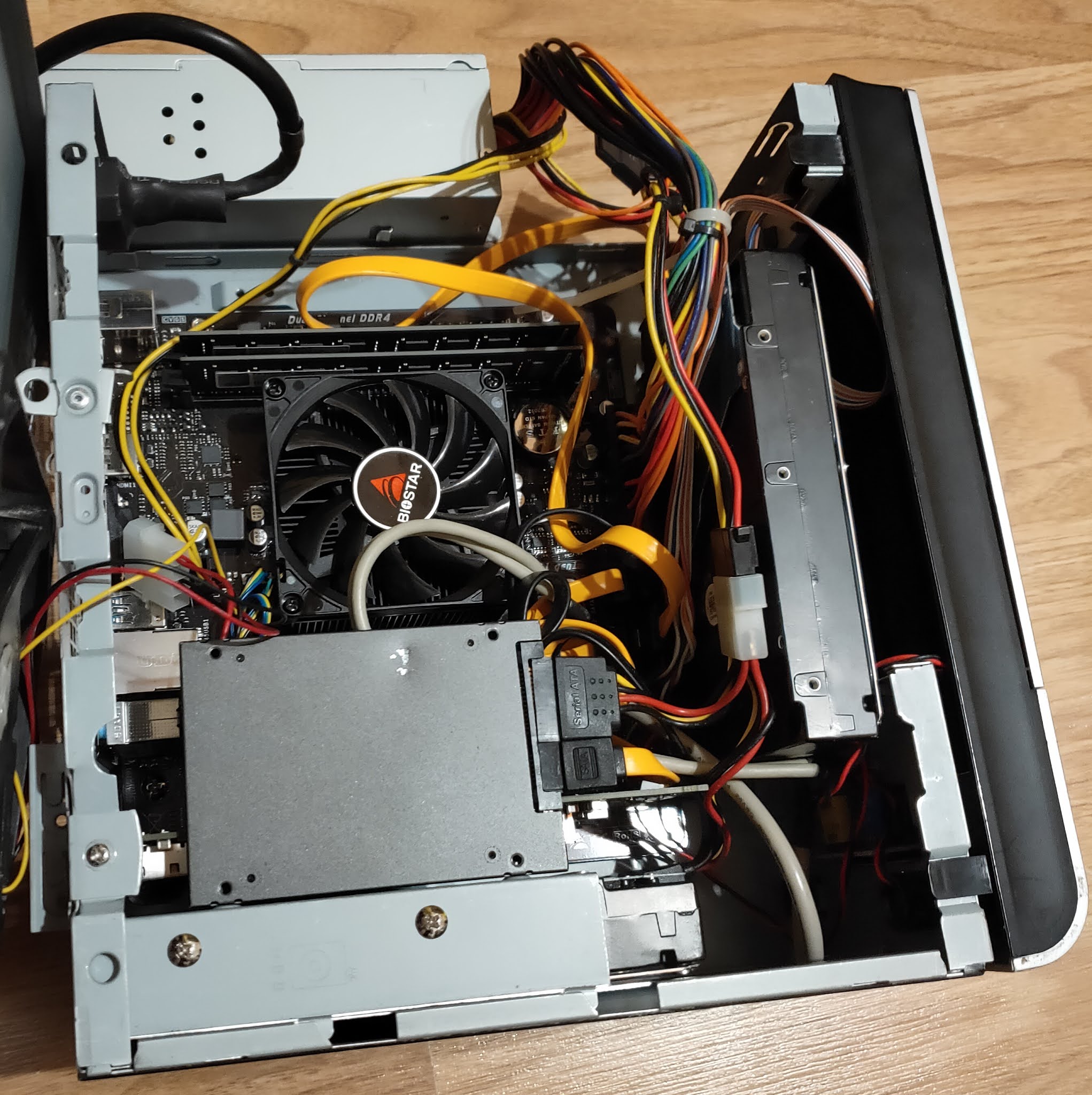
I hit the major obstacle as soon as I tried to place the motherboard inside the case. It is 1.3 cm wider than mini-ITX/mini-DTX standard, thus it was hitting internal PSU. The case hadn't enough space in between to fit. Fortunately, it provided an option to remove just the top part of the case, which gave me an opportunity to exchange the PSU position on the top of the case instead. The stability of such placement comes from the fact that cables are connected pretty tight to motherboard and the PSU has a slide at the bottom by design, which allows to fix it at one corner of the case. It is a workaround and it is not the best solution definitely, but it works pretty well. Once PSU obstacle was solved, the motherboard fit in perfectly. PCIe interface occupies the second extension slot by design, thus only single slot cards can fit (though, by removing HDD cage, likely two slot low profile cards can be used). There are possible alternatives for PSU placement as well I believe to avoid the external placement, but they likely require some modifications to the case. I may investigate those options some time in the future.

Biostar FX9830M VER6.0 motherboard

Placing the hard drives

The second obstacle was to fit two 3.5'' hard drives and one 2.5'' SSD inside. By design it has one 3.5'' cage for HDD. Besides that, it was supposed to have the 5.25'' ODD cage as well, which occupies a big part of the front side of the case, however I likely lost it over the years (I replaced it with the big fan years ago). Because of this, I needed to think out of the box a bit on how to utilize space and, if possible, to avoid external placement. Regarding the SSD drive, I was initially planning to replace it with the Sandisk Extreme Pro 3.0 USB flash drive placed internally using USB 3.0 pin header, but it appeared that pin header is protruding too much to the left, thus hitting the CPU fan. What is more, I wasn't sure if flash drive is not too long vertically as well. Because of this, I decided to stay with Kingston SATA SSD. It had its own challenges because of physically damaged SATA port, but I successfully placed it vertically on top of 3.5'' cage by using holes designed to fix 2.5'' drive. Vertical position was required to avoid the bending of drive's SATA port by the rounded metal edge on the top of the HDD cage. Fortunately, this position wasn't obstructed by the network card as well, though it makes access to it a bit more complicated. The first HDD was placed in the cage itself as designed by the motherboard, thus it didn't pose any issues. Finally, I fixed the second hard drive on the original position of the PSU by fixing it with two screws on a back side frame of the case. Thus, all the drives were successfully placed inside the case, leaving only PSU outside of it. In theory, I still can even add one more drive on the front side instead of the front fan. It may affect the airflow inside the case though, because of this, such setup would need careful testing, especially in the summertime.

Toshiba MG04ACA600E 6TB HDD

As a side fact, two SATA ports are provided by the CPU chipset, another two by ASMedia ASM1062 controller. Non of them provide RAID support. Like I mentioned before, the second SATA port is also connected with the NVMe slot, thus only one of them can be used at the same time.

Network card needs low profile bracket

The final issue was caused by the fact that Dell network card wasn't supplied with the low profile bracket, though it is easily replaceable by the design (standard screws are used). Because of this, I needed to order one from the eBay, while placing the card without it temporarily. I was concerned if it would not easily pop out of the PCIe slot, luckily, however, it stayed very firmly in the position even during cable insertion/removal process.

The final arrangement can be seen in the picture below (before cable management):
Software adjustments

Software wise the Artix Linux didn't boot out of the box, but it was solved simply by recreating initial ramdisk environment, which had also been the typical way to resolve an unsuccessful update process in the past. To my surprise, the SSD drive worked very stable on the new system, despite its damaged SATA port. I didn't experience any boot issues, I could use all the HDD utilities like smarctl, hddtemp without causing system to stall! What is more, it finally utilized its full bandwidth potential, which was very noticeable during upgrade process. 

As initially planned, I replaced NetworkManager service with the dhcpcd and netifrc combination. It was a pretty simple procedure, since only /etc/conf.d/net file required few additional lines to setup bonding interface by the provided example. Once network was ready, I tested copying files between two systems with 10Gbit network, it reached around 165MB/s, which is considerably better than previous speed ranging from 40 to 70MB/s depending on network controller, but likely limited to hard drive capabilities. Because of this, RAID0 setup may be beneficial to increase download speeds even more, just it doesn't seem necessary for me currently. It is also easy to notice snappier file browsing experience. Additionally, I used iperf3 network testing utility which reached ~6.25 Gbit/s between two systems. 

iperf3 testing results

Finally, I could remove all the workarounds applied for the previous system, including enabling the kernel updates again.

BIOS 

The motherboard uses UEFI BIOS with the typical graphical setup controlled by keyboard or mouse. It does not provide as much options as as you may expect from usual desktop gaming motherboard, but it has some specific options which are likely suitable for a business environment and power users (TPM, security, virtualization). For my specific case, I probably mainly missed more controls over fan speed and other power saving features. The motherboard fan is usually very silent but can become noisy on high CPU usage. Also, I didn't find an option to disable main AUDIO device (Realtek ALC887) (except the one from the GFX device). Dell network card supports EFI, thus I changed Network device to prefer UEFI boot instead of legacy one. BIOS provides an option to choose boot device by clicking F9 or enter BIOS flasher with F12 (no BIOS updates are available as of yet). In general, it is still an improvement over old legacy BIOS in Jetway motherboard but may disappoint more demanding people.

I also made a mistake, once I disabled internal NIC controller. It changed link's enumeration number from enp3 to enp2 which I failed to notice initially, thinking it's a possible BIOS bug and reporting it to Biostar. Actually, only simple network reconfiguration was needed.

FX9830M BIOS main screen

Conclusion

In conclusion, the full upgrade process from the hardware side to the software one went quite smoothly. The motherboard proved to be almost compatible with the Mini-DTX cases, with the PSU placement being a major concern. In my case, I resolved it quite easily due to highly modular case design. The final result is considerably stable and faster system with the big potential to utilize it in few different ways, which were not possible previously. I still plan several improvements like data encryption and cold backup in the near future. I am also waiting for the low profile bracket for the network card and a low profile COM bracket which will occupy the upper empty slot (I use serial console in some occasions) to complete the setup. Considering the successful setup with the InWin BM632 case, I started to have doubts about the need of replacing it with Fractal Design Node 304 or similar case, as I initially envisioned. I believe, I will likely look into all other options first before doing such purchase. As of today, the main concerns are to reintroduce double backups, better secure the data and utilize the new system for routine actions which I am doing either manually or using scripts. And hopefully, the system will serve me no less than the one it replaced!

2020-10-27

NAS upgrade to Biostar FX9830M board

Intro

Despite my recent projects and various minor hardware updates on the old NAS server, which you can read about in my previous blog posts, I have been already looking around for the major hardware update. I was not sure how long the search will take due to reasons I will explain shortly but the aging system was being pushed to its limits and it was only a matter of time before stability, performance, requirements, and other factors will start to drift away from the reasonable levels. In addition to those factors, I was constantly upgrading my other hardware, including gradual upgrade to 10Gbit based local network. Better utilization of it outside simple technology playground and testbed,  were complementing motivational factors to spend additional resources on NAS modernization, which would allow me to focus on its main purpose instead of putting most of efforts for workarounds and patches just to keep it running reasonably well. 

Inside Jetway JNF-76 based NAS system

The search

The market changed quite a bit since the time I bought Jetway JNF76 back in 2009. Introduced by VIA Technologies mini-ITX form factor was still quite strong, various solutions were available ranging from home to industrial/embedded market. Specialized online computer shops selling such hardware were still in business. Once I started looking for the new board a year or so ago I noticed that most of the stores I've used to buy such products are either gone or their business transformed into different directions. VIA Technologies itself also generally left the consumer market and x86 CPU business (I know that they have joint venture in China, but those solutions have zero availability outside China and I don't associate them directly with VIA anymore. As a proof of that, just recently VIA announced plans to sell its part in the joint company). It's not that the market completely vanished, there are new stores which sell similar products in the sea of other stuff but they are not that focused and specialized as before. On top of that, ARM based solutions started to push into small PC market but I am not completely ready to go in this direction yet and they usually don't have required specifications. Finally, this time I really limited my budget which forced me to look to home/end user solutions instead of ones server/embedded ones. Unfortunately, in this space motherboards surprisingly went away from mini-ITX form factor besides few pretty expensive gaming focused solutions or very cheap Atom CPU based ones, which have quite limited specifications. Mini-PCs seemingly moved mainly to custom size barebones or NUCs. Because of this, the right solution was really extremely hard to find with the requirements I expected to fulfill:

  • At least 4 SATA III ports
  • PCIe 2.0 x8 electrically (not just a physical slot)
  • Energy efficient CPU, preferably soldered to motherboard and passively cooled.
  • At least two USB 3.0 or higher ports
  • Ideally mini-ITX form factor
  • Small price (< 200 euros)
  • Readily available

Biostar FX9830M motherboard took my attention as soon as it was announced early spring this year. It looked almost like an ideal solution, having PCIe x16 slot (x8 electrically), 4xSATA ports + M.2 slot, 2xUSB 3.0 (marketed as USB3.2 Gen1) plus internal header for 2 more. It checked most important ticks with some caveats: 

  • Adding SSD drive to M.2 port disables one SATA port, thus making me to choose between setup of 4 hard drives + USB 3.0 system drive or 3 HDDs + 1 fast system SSD in the M.2 port.
  • SATA controllers do not support RAID.
  • AMD FX-9830P CPU TDP is 35W, which is a bit high (VIA U2300 is 5W TDP CPU + 5W for VX800 chipset). In addition, it is actively cooled.
  • Serial port is not available in the backpanel (COM header exists though).
  • Actual availability was completely missing till early/mid October both in my country or in the international online stores like Amazon. By the time of writing, it is still looks scarcely available, at least in Europe.
  • The worst issue that I initially overlooked, that it is not mini-ITX form factor board, but a little bit bigger one, having 200mmx183mm dimensions instead of 170x170mm. 

Nevertheless, once I finally found a very small batch of these motherboards available in the local computer and electronics shop few weeks ago, I didn't hesitate much and decided to build new NAS system around this model. I deemed the points mentioned above non significant to my envisioned setup and adjustable in one way or another. The price of the board was a bit above 100 euros.

Biostar FX9830M motherboard

Overcoming the size issue

The motherboard size is not a microATX as claimed by Biostar, thus I did some research if it can fit some small cases (bigger than current one but smaller than microATX). It almost conforms with mini-DTX size, but requires extra 1.3cm width, since mentioned form factor size is 203x170 mm (width matches with mini-ITX). Since the motherboard doesn't conform to any actual form factor, Biostar simply labeled it as microATX one, though full size microATX (244x244 mm or 4 expansion slots) case would be definitely a waste. It would definitely fit into DTX case but this AMD proposed form factor didn't gain popularity, thus marketing team probably decided to avoid mentioning it. Considering the size of the board, it became clear that it likely fits into some mini-ITX cases with two expansion slots (considering the mentioned a little extra width is available which may not be always the case). Fractal Design Node 304 solution seems to be one of the best options to consider, since it officially supports mini-DTX and can accommodate up to 6 hard drives, which is perfect for my NAS server needs. From the videos and photos available I am not completely sure if extra width won't be hindered by PSU frame, but the frame looks removable in the worst case (combined with SFX/TFX/picoPSU instead of traditional ATX one). To save initial costs though, I decided to utilize my old InWin BM639 case, which was used for my VIA EPIA-M900 board based computer in the past. It happens to have two slots and fits the board with some workarounds.

InWin BM632 case

The network setup

As mentioned before, one of the main motivational reasons was ability to utilize local 10GBit network. This decision was accelerated by few important recent purchases. The major one was MikroTik CRS309-1G-8S+IN 8 port SFP+ 10Gbit switch. It was supplemented by Asus XG-C100F Aquantia AQC100 based SFP+ network adapter. The Asus card was important because it is supported by NetBSD (and FreeBSD). It enabled me to completely switch to 10GBit interface on my main computer. In addition, I have previously acquired Dell QLogic 57810 10Gbit double SFP+ port Ethernet card. This particular network adapter will be transferred to NAS server, thus it dictated the requirement for PCIe 2.0 x8 slot. Since it has two ports, network aggregation can be utilized in similar manner as the current 1Gbit setup (Mikrotik switch supports interface bonding from its side as well). Finally, I still have Tehuti TN4010 based Edimax EN-9320SFP+ adapter bought back in 2018, which allows me to connect one more computer when/if needed.

Mikrotik CRS309-1G-8S+IN

Asus XG-C100F

Storage setup

The original plan was just to transfer my original setup: 2x6TB hard drives plus 2x3TB drives in LVM RAID0 setup for the second backup. Backup drives are initially synchronized using rsync software once a day, though at different time frame for each backup. Unfortunately, just before the purchase of the new board one of my old 3TB HDDs died. Thus, only new 6TB drives will be used from day one. In the future, I plan to go back to the double backup, however I am not sure yet what will be the final setup in this case (I can see few options: manual sync as before, or RAID0+1 setup (using LVM), or separate cold backup using USB3.0 or network). For the system drive I currently planning to switch from SATA SSD, to USB3.0 SSD drive placed inside computer case using Delock USB3.0 pin header. This decision is mainly driven by damaged SATA port on current system SSD drive, which I believe is causing some stability issues. Besides that, initial plan was to utilize all 4 SATA ports by data HDDs until recent failure. 

Software wise the main operating system will stay Artix Linux with OpenRC init system. Additionally, I am planning to introduce full data encryption. Finally, considering the need to configure new network interfaces, I may switch to dhcpcd/netifrc instead NetworkManager for DHCP client and network management to simplify my software stack and use partially familiar tools (dhcpcd is default DHCP client in NetBSD).

Bonus improvements

Very important expectation is increased stability of the system. Though current system wasn't particularly unstable once booted, but it had serious issues on the boot process itself, mainly because of ADPE4S-PB daughterboard and likely also because of damaged SATA port on system SSD drive. It was partially circumvented by using my very old external PCI SATA controller but it had limited system performance (theoretically SATA I but in practice twice or more slower because of drivers), still wasn't 100% stable and had limited expansion capabilities. FX8300M motherboard has mature AMD platform which is well supported by Linux kernel, thus stability should not be an issue anymore. Same applies to Dell network card which I have tested in my personal computer for several months. As a bonus, much higher CPU performance will allow me to focus and NAS related configurations (encryption, NFS, samba, RAID) and various additional background services and scripts (rsync, fossil-scm, git, torrents, streaming, filtering, folding@home at certain occasions, etc). Additional perks include more modern UEFI BIOS with reacher configuration and boot options, possibly higher hard drive capacity support (though I haven't hit the limit with JNF-76), USB 3.0 for additional flexibility on external storage, SATA 3 instead of SATA 2 (VIA chipsets have never upgraded to SATA 3 for some reason). Very fast PCIe 3.0 based SSD in M.2 slot is also an option for system drive in the future, that is in case I won't need all 4 SATA ports. And finally, the board supports up to 32 GB of RAM (initially opted 16GB), which should be more than enough for NAS server including any additional services. I really hope to use this system for similar timeframe as original one, which is around 10 years or more. 


I am planning to write a follow up article once setup is ready.